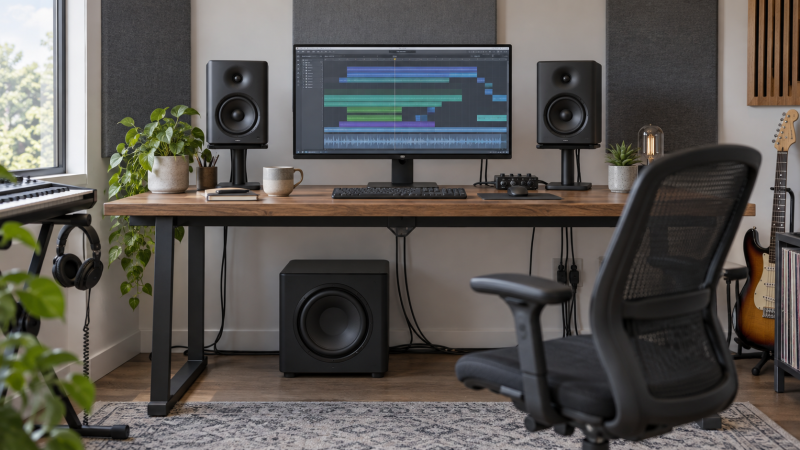
A subwoofer can reveal low-frequency mistakes that small desk monitors miss. It can also make an untreated editing room sound less trustworthy by exciting a bass note that booms at one seat and disappears at another. The right purchase starts with monitor connections, crossover control and room behavior, not the largest driver or lowest advertised frequency. If your room has a serious bass null, more sub level will not fill it at the listening position.
The six powered subwoofers here fit different small-room workflows: compact eight-inch models, a ten-inch studio choice, Bluetooth-enabled desktop options and systems with monitor bypass. Verify offers and exact variants before buying. None replaces positioning, sensible levels or listening on a second system. The goal is to hear bass decisions more reliably, not to make every edit sound bigger.
Check your interface outputs and monitor inputs before ordering. Then plan where the sub will sit, how its crossover hands off to the main speakers, and how you will compare mixes with the sub both on and off.Powered Studio Subwoofers Compared
| Image | Product | Details | Check Price |
|---|---|---|---|
 | PreSonus Eris Sub 8BT | Driver: 8-inch front-firing Inputs: Balanced TRS, RCA, Bluetooth Controls: High/low-pass filters Best fit: Flexible small desk | Check Price on Amazon |
 | Yamaha HS8S | Driver: 8-inch bass-reflex Controls: Low/high cut, phase Power: 150W listed Best fit: Manual crossover tuning | Check Price on Amazon |
 | Mackie CR8SBT | Driver: 8-inch Inputs: TRS, RCA, Bluetooth Controls: Desktop volume/bypass remote Best fit: Quick desktop A/B | Check Price on Amazon |
 | KRK S8.4 | Driver: 8-inch front port Controls: Optional footswitch bypass Power: Class D listed Best fit: Hands-free sub check | Check Price on Amazon |
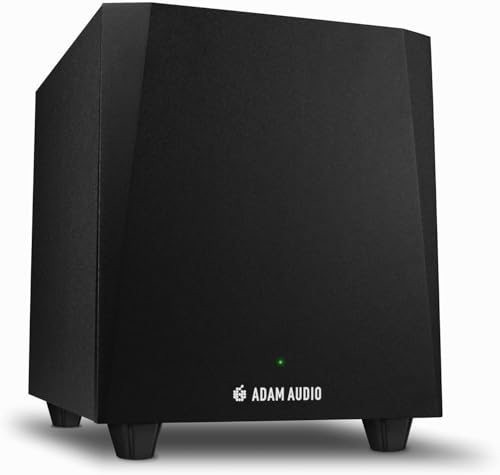 | ADAM Audio T10S | Driver: Downward-facing Controls: Crossover, phase, bypass Monitor fit: T5V/T7V designed match Best fit: ADAM T-Series desk | Check Price on Amazon |
 | Mackie MRS10 | Driver: 10-inch Inputs: Stereo XLR and TRS Power: 120W Class A/B listed Best fit: Balanced ten-inch chain | Check Price on Amazon |
1. PreSonus Eris Sub 8BT — Best Compact Bluetooth and Wired Option
PreSonus describes Eris Sub 8BT as a front-firing eight-inch powered subwoofer with balanced quarter-inch TRS inputs, unbalanced RCA inputs and Bluetooth 5.0. Those wired choices suit an editing desk with either a professional interface or a consumer source. The listing also names high-pass and low-pass filter controls, which do more for monitor integration than Bluetooth alone. Its 100W and 30Hz figures are manufacturer claims, not measurements of your room’s response.
Bluetooth can be useful for casual listening, but keep the wired interface-to-monitor path as the reference for timing-critical edits. Check the exact output routing and whether the main monitors receive a high-passed signal in your setup. A front headphone output is listed for quick switching, yet headphones are a separate reference, not proof that the room’s bass is accurate. Place the sub, listen at moderate level, and compare with it bypassed before deciding that it improves a mix.
Our Take Pick Eris Sub 8BT when a small desk needs flexible wired inputs and occasional Bluetooth listening. Use the crossover controls carefully. Wireless convenience is not the monitoring reason to buy it.
- Balanced TRS and unbalanced RCA inputs listed.
- High-pass and low-pass controls.
- Bluetooth option for noncritical playback.
- Wired routing still needs planning.
- 30Hz listing claim is not room performance.
2. Yamaha HS8S — Best Manual Crossover Controls
The exact Yamaha listing is titled HS8 Studio Subwoofer, and the identified model is HS8S, an eight-inch bass-reflex powered sub. Its feature text names low-cut and high-cut controls with an 80 to 120Hz adjustment range and a phase switch. Those controls let you work on the handoff between the sub and desk monitors rather than simply turning the bass up. Yamaha lists a 150W amplifier and a 22 to 150Hz response. Treat both figures as product specifications, not a measured response at your chair.
The listing’s short feature set does not establish every connector or cable you need. Confirm the rear-panel input and output configuration for the exact unit before building the signal chain. Start with a modest crossover, compare the mains alone and adjust placement before boosting the sub level. A phase switch may help integration at one position, but it cannot correct every room-mode problem in a compact studio.
Our Take Choose HS8S when hands-on cut and phase controls are the priority. It is a tool for deliberate monitor integration, not a shortcut around room acoustics.
- Adjustable low/high cut listed.
- Phase switch for setup checks.
- Eight-inch powered studio format.
- Confirm exact connectors and cables.
- Published frequency range is not in-room proof.
3. Mackie CR8SBT — Best Desktop Bypass Control
Mackie’s CR8SBT is an eight-inch studio sub sold for the CR monitor line. The listing names TRS and RCA connections, an adjustable crossover, Bluetooth input and a desktop remote for volume and sub bypass. A reachable bypass switch is useful in editing. It makes it easy to hear whether a bass decision survives without the sub instead of leaving the sub engaged because the rear-panel switch is inconvenient.
The listing does not establish that every non-CR monitor combination will integrate equally. Check signal levels, monitor inputs and the exact routing for your desk. Bluetooth is handy for secondary listening, but the wired connection should be the primary editing path. Remote control adds another cable and a place on the desk, so make sure it solves a workflow problem rather than becoming clutter.
Our Take Pick CR8SBT when quick sub on/off comparison is central to your work. Its remote is useful only after the wired monitor path and crossover are set correctly.
- Desktop volume and bypass remote.
- TRS/RCA wired connections listed.
- Adjustable crossover.
- Designed around Mackie CR monitors.
- Remote adds another desk component.
4. KRK S8.4 — Best Footswitch-Ready Checking
KRK lists the S8.4 as an eight-inch powered studio subwoofer with a glass-aramid woofer, a front-firing bass port and Class D amplification. The feature text gives a 30Hz bass-extension figure and a 112dB maximum-SPL claim. Those numbers may help identify the model, but they do not say what your small room will sound like. The practical feature is a footswitch connection that can disable the sub and crossover filter for comparison, but the switch itself is not included.
The bypass workflow can help you check whether an edit works on the main monitors alone. Verify the switch type and signal routing before buying accessories. A front port may make some placements easier, but a subwoofer still interacts with walls, desk and listening position. Move it and listen for even bass rather than assuming the front port makes placement irrelevant.
Our Take Choose S8.4 if you want a studio sub with an optional hands-free bypass workflow. Budget for the footswitch separately and set levels from the room, not the SPL claim.
- Optional footswitch bypass described.
- Front-firing port.
- Eight-inch powered studio design.
- Footswitch not included.
- Published bass extension is not in-room response.
5. ADAM Audio T10S — Best T-Series Monitor Match
ADAM Audio positions the T10S as a compact active subwoofer designed to complement its T5V and T7V monitors. The exact listing describes a downward-facing woofer, adjustable crossover, phase rotation switch and dedicated volume control. If your desk already uses T-Series monitors, the stated design match gives you a sensible starting point for setup. The match does not mean the sub can be dropped anywhere in a small room without measurement or listening.
The listing also mentions a rear sub-bypass connection for an optional footswitch. Check whether that accessory is included and how the monitors are routed through the sub. A downward-facing driver can offer placement flexibility, but floor, wall and chair position still change the response you hear. If you use non-ADAM monitors, confirm connector and level compatibility before assuming the same integration.
Our Take Pick T10S when you already use compatible T-Series monitors and want the designed pairing. Still tune phase, crossover and placement for the actual room.
- Designed for ADAM T5V/T7V monitors.
- Crossover and phase controls listed.
- Optional bypass connection.
- Designed pairing does not solve room modes.
- Check bypass accessory and connectors.
6. Mackie MRS10 — Best Balanced Ten-Inch Alternative
The MRS10 is a ten-inch studio subwoofer with a listed 120W Class A/B amplifier, glass-aramid composite woofer and shelf-ported enclosure. The exact Amazon feature text names stereo XLR and TRS connections, a useful distinction if your interface and monitors use balanced lines. The MRS10 is a different Mackie line from the Bluetooth-enabled CR8SBT. Do not treat a shared brand as identical controls or routing.
The short listing does not specify every crossover or bypass function, so check Mackie’s documentation before making those a purchase reason. A larger driver may extend bass, but it can also make small-room placement more sensitive. Keep the listening level moderate, test several positions, and compare against the main monitors alone. Do not assume the title’s awkward “-Channel” wording describes a special channel count. The supported connection fact is stereo XLR/TRS.
Our Take Choose MRS10 when balanced stereo connection and a ten-inch studio sub fit the existing signal path. Verify controls from documentation before building the room around it.
- Stereo XLR and TRS connections listed.
- Ten-inch studio sub format.
- Separate from the CR desktop line.
- Crossover/bypass details need confirmation.
- Larger cabinet may be harder to place.
Buying Guide: Integrate the Sub Before Judging It
Check the signal path from interface to monitors
Map left and right interface outputs through the intended sub inputs and on to the main monitors, where the exact product supports that routing. A balanced TRS or XLR path can reduce connection headaches with a professional audio interface, while RCA may suit a consumer desk. Do not assume a sub with an input also provides the required output or filtering for your monitors. Confirm sockets and cable genders from the specific model documentation.
An ear-level desktop speaker-stand guide can help position the main speakers before adding bass extension. If their height or angle is wrong, a sub will not correct the midrange image. Keep the source level consistent while comparing playback on the main monitors only and with the sub enabled, or a louder setting may seem “better” for the wrong reason.
Set crossover, phase and level as a system
Start with the crossover around the useful low end of the main monitors, then adjust by listening or measurement. A handoff set too high can make bass easy to localize and muddy low-mid detail, while one set too low can leave a gap. Yamaha documents adjustable high/low cut, and several other products list crossover controls, but the exact filter slopes and routing differ. Read the manual for the unit you own rather than copying a number from another studio.
Use the phase and bypass controls to compare the combined response at the editing chair. A switch can reveal cancellation near the crossover, but it cannot fix every null caused by the room. If you work with several speaker pairs, the studio monitor-controller guide covers source and speaker selection, but it does not replace crossover setup or acoustic treatment.
Treat room position as part of the purchase
Small rooms often have standing-wave peaks and nulls. A sub positioned for maximum excitement may exaggerate one bass note and hide another. Move the sub, move the chair slightly, and compare familiar reference material. If possible, measure the response at the listening position. A bass trap or placement change may improve trust in the room more than a more powerful subwoofer.
Leave floor and cable clearance for the cabinet and any footswitch or remote. ADAM specifies a downward-facing driver for the T10S, the KRK S8.4 lists a front port, and the other enclosures have their own placement needs. Do not wedge a unit into a corner solely because it fits there. Keep the level conservative. A sub is for revealing low-end decisions, not impressing visitors.
Frequently Asked Questions
Will a subwoofer fix weak bass in my small room?
It may extend playback below what your desk monitors reproduce, but it will not remove room-mode cancellation. If a note disappears at the chair because of the room and placement, turning up the sub can make other notes louder without restoring that one. Check the room before treating any model as a guaranteed fix.
Try several sub locations, compare on and off at a matched level, and use reference tracks you know well. If the low end becomes less predictable, work on placement or acoustic treatment first. Headphones and another playback system can provide a useful second check while you sort out the room.
Is Bluetooth suitable for critical audio editing?
For critical editing, a wired and repeatable monitor path is easier to align, troubleshoot and compare. Bluetooth on the PreSonus Eris Sub 8BT or Mackie CR8SBT can be convenient for casual playback. A wireless path can add latency or processing that varies by host and codec, so use wired monitoring for critical edits.
Keep Bluetooth as a secondary input if you value it. Run the actual editing session from the audio interface through the wired speakers and sub, then verify that bypass and level settings behave consistently.
Do I need a matching-brand subwoofer?
Not always. A matching line, such as the ADAM T10S with T5V/T7V monitors, may provide a documented integration starting point. The purchase still depends on input/output compatibility, crossover controls and room placement. A different-brand sub can work when those pieces are checked carefully.
Do not assume that every model from the same brand shares the same controls. The Mackie CR8SBT and MRS10 differ. One listing emphasizes a desktop remote and Bluetooth, while the other lists balanced stereo XLR/TRS. Choose the exact routing your desk needs.
Bottom Line
Choose a powered studio sub around the monitor chain and the room, not the lowest advertised frequency. PreSonus and Mackie CR8SBT offer flexible desk playback. Yamaha, KRK and ADAM give hands-on integration paths. Mackie MRS10 adds a balanced ten-inch option. If the room cannot produce an even low end at the chair, resolve placement and acoustics before paying for a larger cabinet.