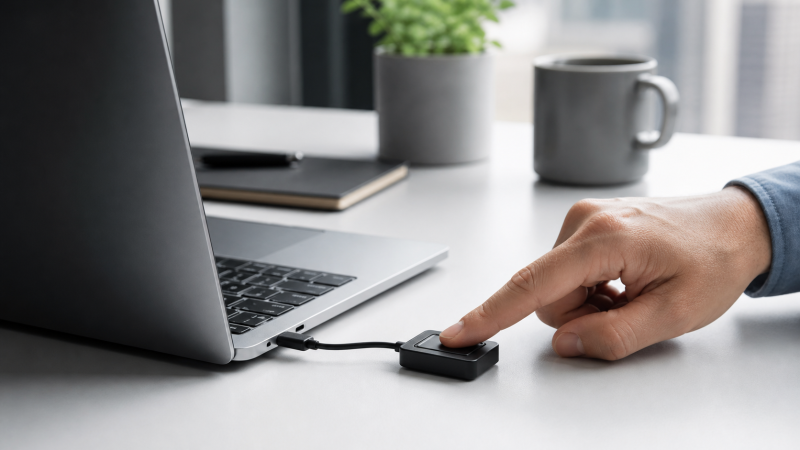
If your laptop lacks a reliable fingerprint sensor, a USB-C reader can add Windows Hello login without a USB-A adapter. Every retained listing states USB-C directly.
The six readers differ by physical format, pass-through capability, and stated FIDO2 or business-login support. Match those listing claims to the laptop and account you use.
Key Takeaway: Every reader here is a Windows Hello device built for Windows 10 or 11. None of the six listings mention macOS support, so if you carry a MacBook, none of these six are a confirmed fit. Beyond that, the real split is between a compact USB-C-only key, a dual-connector reader built with desktop use in mind, and the one option that also works as a basic USB-C passthrough port.
A note on where these specs come from: the details below are pulled directly from each product’s own Amazon listing. None of these six sellers has a separate manufacturer spec sheet or support page that independently confirms those claims, so treat every listing-stated spec as the seller’s own word rather than a third-party-verified measurement.
Quick Picks
- Most flexible connector: Kensington VeriMark Desktop 2.0, works with both USB-C and USB-A ports
- Best for managed business logins: Kensington VeriMark IT 2.0, built around Windows Hello for Business
- Best budget pick: TNP USB-C Fingerprint Reader, a simple single-purpose reader
- Best plug and play simplicity: Yoidesu USB-C Fingerprint Reader, no driver hunting per its own listing
- Best compact portable pick: BONKZEBU USB-C Fingerprint Scanner, marketed as a mini portable device
- Best USB-C passthrough pick: Portable Type-C Fingerprint Reader, doubles as a charging and data passthrough port
| Image | Product | Details | Check Price |
|---|---|---|---|
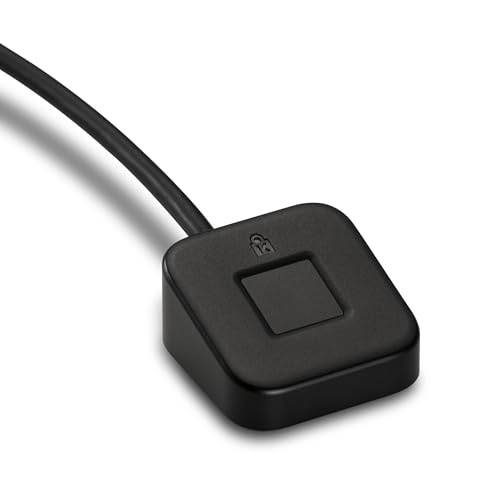 | Kensington VeriMark Desktop 2.0 | Connector: USB-C and USB-A listed Login: Windows Hello with ESS listed Buyer check: FIDO U2F, FIDO2, and TAA claims | Check Price on Amazon |
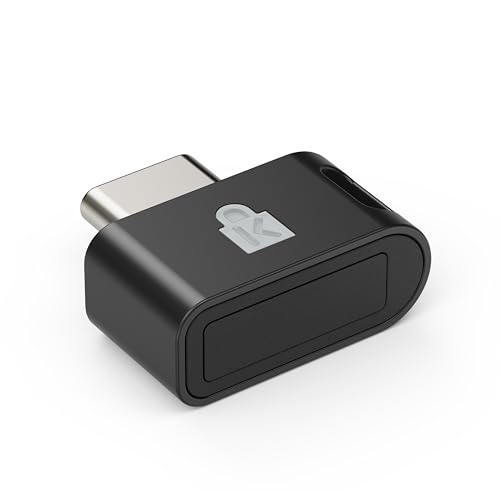 | Kensington VeriMark IT 2.0 | Connector: USB-C listed Login: Windows Hello and Windows Hello for Business listed Buyer check: 360-degree reader claim | Check Price on Amazon |
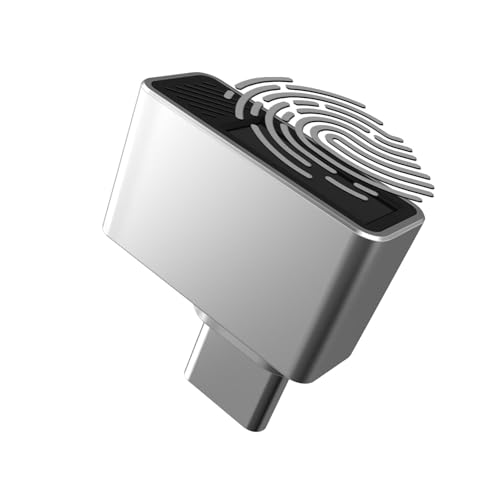 | TNP USB-C Fingerprint Reader | Connector: USB-C listed Login: Windows Hello for Windows 11/10 listed Buyer check: All-direction registration claim; no FIDO2 claim stated | Check Price on Amazon |
 | Yoidesu USB-C Fingerprint Reader | Connector: USB-C / USB Type-C listed Login: Windows 11/10 PC and laptop compatibility listed Buyer check: Plug-and-play and enterprise-security wording are seller claims | Check Price on Amazon |
 | BONKZEBU USB-C Fingerprint Scanner | Connector: USB-C listed Login: Windows Hello compatibility listed Buyer check: Mini portable positioning; availability can change | Check Price on Amazon |
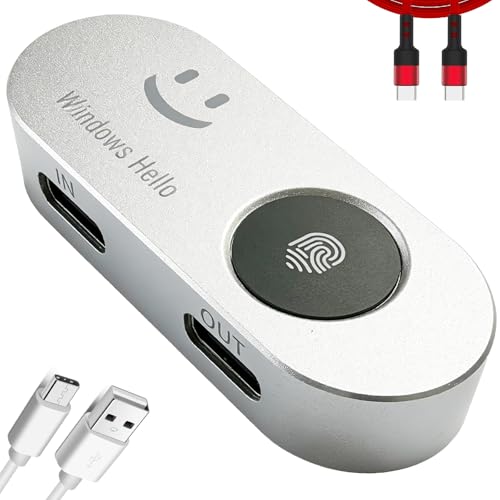 | Portable Type-C Fingerprint Reader | Connector: USB-C listed Login: Windows 10/11 and 360-degree touch listed Buyer check: Pass-through charging/data claim; confirm limits | Check Price on Amazon |
1. Kensington VeriMark Desktop 2.0 — Best for USB-C and USB-A Flexibility
Kensington’s listing describes the VeriMark Desktop 2.0 (model K64741WW) as supporting both USB-C and USB-A connections from the same reader, which is unusual among the readers in this guide. Its own feature text calls it “reliable wired USB fingerprint authentication with USB C and USB A compatibility for desktop PCs,” so a Type-C connection is a stated native option, not an adapter workaround. The listing also states Windows Hello support with ESS (Enhanced Sign-in Security) for Windows 11, along with FIDO U2F, FIDO2, and TAA compliance.
FIDO2 can support compatible passwordless services beyond Windows login, while TAA compliance matters for purchases that must meet that procurement rule.
Our Take Kensington’s own listing calls this a reader “for desktop PCs” rather than a laptop-first design, so it is worth confirming cable length and footprint if you plan to keep it next to a laptop keyboard rather than a desktop tower. The dual USB-C and USB-A support is the real reason to pick it over a USB-C-only key: it stays useful if you switch to a laptop with only USB-A ports later.
- Works with both USB-C and USB-A ports, so it still fits a laptop that loses its USB-C port to a dock or charger
- Kensington’s listing states FIDO U2F, FIDO2, and TAA compliance, useful for passwordless login and government-purchase requirements
- Windows Hello with Enhanced Sign-in Security (ESS) support stated for Windows 11
- Kensington’s own listing markets it as a reader “for desktop PCs,” so check its size and cable length against your laptop setup before ordering
2. Kensington VeriMark IT 2.0 — Best for Business Deployment
The VeriMark IT 2.0 (model K64705WW) states USB-C directly in its own title, with no USB-A option mentioned, so this is a Type-C-only key rather than the dual-connector design of the Desktop 2.0 above. Kensington’s listing describes a 360-degree fingerprint reading area, meaning the sensor is built to read a finger from any angle rather than requiring one specific orientation on every scan. The listing also names Windows Hello and Windows Hello for Business support, along with password-free login.
The stated Windows Hello for Business support makes this the relevant Kensington option for an organization-managed laptop.
Our Take If your laptop is enrolled in a company’s Windows Hello for Business setup, this is the more directly relevant pick between the two Kensington readers here. For a personal laptop with no business identity management involved, the plain Windows Hello support on the Kensington VeriMark Desktop 2.0 covers the same basic login use case.
- Title states USB-C as the sole connector, so there is no adapter ambiguity to sort out
- 360-degree fingerprint reading area stated in the listing, so registering and later scans do not require a specific finger orientation
- Windows Hello for Business support named directly, useful for a company-managed login setup
- The listing does not state FIDO2 or FIDO U2F certification the way the Desktop 2.0 model does, so confirm that separately if a FIDO2-certified key specifically is the requirement
3. TNP USB-C Fingerprint Reader — Best Budget Pick
TNP’s listing keeps things simple: a USB-C fingerprint reader with Windows Hello support for Windows 11 and 10, stated directly in the product title. Its feature bullets also state 360-degree, all-direction fingerprint registration. The listing does not state FIDO2 certification or business identity integration. This is a single-purpose device aimed at one job, replacing a password prompt with a fingerprint scan.
The listing confirms USB-C, Windows Hello, and all-direction fingerprint registration, but not FIDO2 or business identity integration.
Our Take This is the pick for someone who wants the basic fingerprint-login upgrade without paying for or managing extra features. If FIDO2 support or business-account integration actually matters for your use case, the Kensington VeriMark Desktop 2.0 or Kensington VeriMark IT 2.0 states that detail directly and this one does not.
- Listed specifically for USB-C, with Windows Hello support stated for both Windows 11 and Windows 10
- Single-purpose design, useful if you want a plain login upgrade without extra features to configure
- TNP’s listing is thin on detail. It states no FIDO2 support, sensor accuracy figure, or additional certification, so a buyer who needs those specifics should look elsewhere for confirmation
4. Yoidesu USB-C Fingerprint Reader — Best Plug and Play Simplicity
Yoidesu’s own title states “Plug and Play” and names the device as a “USB Type-C Fingerprint ID Device” separately from its “USB-C Fingerprint Reader” description earlier in the same title, so the USB-C connection is stated twice, not implied once and left ambiguous. The listing states compatibility with Windows 11 and Windows 10 on both PC and laptop, and pitches the reader around fast, secure login authentication.
The plug-and-play wording targets simple setup, but remains the seller’s description rather than an independently confirmed setup benchmark.
Our Take Pick this one if minimal setup friction is the priority and you do not need the added FIDO2 or business-deployment claims that the Kensington VeriMark Desktop 2.0 states. It sits in the same simple, single-purpose category as the TNP USB-C Fingerprint Reader, with the plug and play framing as its specific pitch.
- Yoidesu’s title describes it as plug and play, aimed at a simple setup path
- Compatible with Windows 11 and Windows 10 on both PC and laptop, per the listing
- The listing does not state FIDO2 certification; its enterprise-security wording is seller-stated rather than an independently verified deployment qualification
5. BONKZEBU USB-C Fingerprint Scanner — Best Compact Portable Pick
BONKZEBU’s listing states “USB C Fingerprint Scanner” and “USB C Fingerprint Reader” directly in the title, with the connector stated as the product’s own connection rather than a compatibility note. The listing also describes it as a “Mini Portable Biometric Fingerprint Authentication Device,” built for PC and laptop use with Windows Hello compatibility.
Its “Mini Portable” wording is the relevant distinction for carrying between a laptop bag and desk. The captured limited-stock note is a snapshot, so confirm availability.
Our Take This is the pick if portability specifically matters, meaning you plan to move the reader between locations rather than leave it seated in one laptop’s port. If you want that same USB-C simplicity but also want the reader to double as a basic passthrough port, the Portable Type-C Fingerprint Reader below covers that instead.
- Marketed as a “Mini Portable” device in its own listing, useful if you want a reader small enough to carry along with a laptop
- Windows Hello compatible for both PC and laptop use, per the listing
- This listing showed limited stock when this guide’s product data was compiled, so confirm current availability before ordering
6. Portable Type-C Fingerprint Reader — Best USB-C Passthrough Pick
This reader is sold under an unbranded “Generic” listing rather than a named manufacturer, so there is no separate brand page to cross-check its claims against. Its own feature text states plug-and-play compatibility “on any Windows 10/11 laptop or PC with a USB-C port,” along with 360-degree touch reading and a login speed rated under one second. The listing title also calls it a “Type-C Fingerprint Reader with Security Key,” though the listing text does not separately confirm FIDO2 or FIDO U2F protocol support the way the Kensington VeriMark Desktop 2.0 does, so treat “Security Key” here as the seller’s general description rather than a confirmed FIDO2 certification.
Its stated USB-C pass-through charging and data port differentiates it from a simple key. The packet does not establish passthrough behavior, wattage, or speed, and the limited-stock note is only a snapshot.
Our Take Consider this one specifically if the USB-C passthrough function is useful to you, since none of the other five readers in this guide state that capability. If you just want a straightforward fingerprint key with no secondary function, the TNP USB-C Fingerprint Reader or Yoidesu USB-C Fingerprint Reader cover that more plainly.
- Listing states a built-in USB-C pass-through charging and data port, so it can double as a basic passthrough connector while it authenticates you
- 360-degree touch reading and a login speed rated under one second, per the listing
- Sold under an unbranded “Generic” listing with no separate manufacturer page to confirm specs against, and this listing showed limited stock when this guide’s product data was compiled
Buying Guide
Windows Hello Comes First, Mac Support Does Not
All six listings name Windows Hello and Windows 10 or 11. The Kensington models add Enhanced Sign-in Security or Windows Hello for Business, which are useful checks for a managed work laptop.
None states macOS or Apple support. That absence does not prove a reader cannot connect physically, but it leaves every model unconfirmed for Mac fingerprint login.
USB-C Alone vs a Reader That Also Passes Through Power and Data
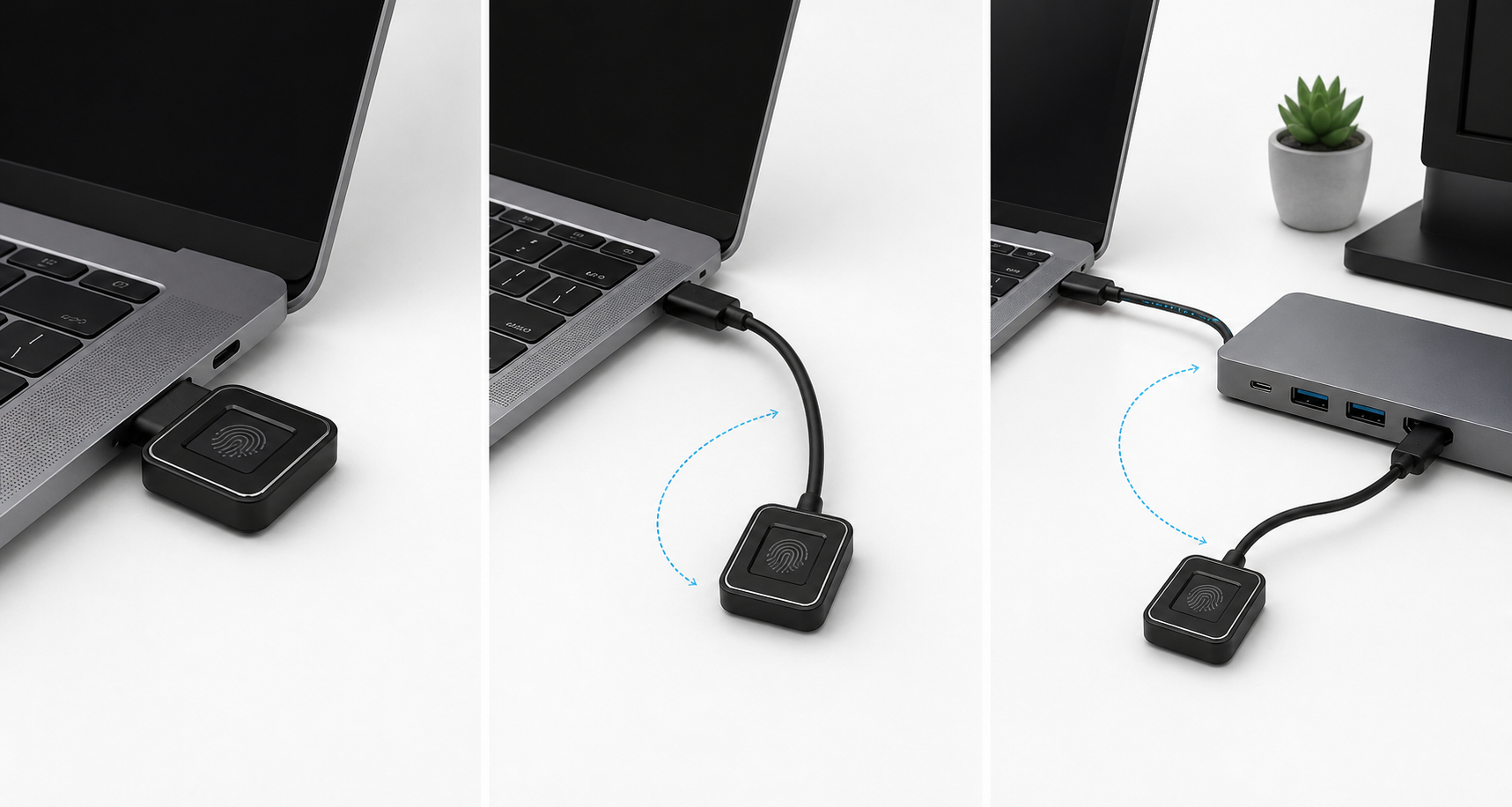
Five listings describe a single-purpose USB-C reader. The Portable Type-C Fingerprint Reader alone states a USB-C pass-through charging and data port.
Choose that model only when preserving a port matters. Its listing does not establish passthrough wattage or data speed, so confirm both before making it part of a daily charging path; our USB-C hub guide covers broader port expansion.
If the pass-through reader uses a detachable lead, our USB-C cable guide can help separate a connector match from a charging-only cable.
FIDO2 and Business Deployment Features Are Not Standard Across the Board
The Kensington VeriMark Desktop 2.0 states FIDO U2F, FIDO2, and TAA compliance. FIDO2 matters when a compatible service needs a passwordless security key beyond local Windows sign-in.
The Kensington VeriMark IT 2.0 instead states Windows Hello for Business. The other listings do not state either feature, so do not assume a business or FIDO2 requirement is met without confirmation.
Compact Key vs Desktop-Style Reader: Matching the Reader to How You Actually Work
The compact USB-C keys suit a laptop bag, while Kensington describes the Desktop 2.0 as a reader for desktop PCs with both USB-C and USB-A support. The BONKZEBU USB-C Fingerprint Scanner explicitly uses “Mini Portable” wording.
Choose by placement, not connector alone. Confirm cable length and footprint from the current listing when a reader will stay beside a docked laptop.
Checking Stock and Connector Type Before You Buy
BONKZEBU and the pass-through reader showed limited stock in the packet, which is a snapshot rather than a trend. Confirm availability before ordering.
Every retained listing explicitly named USB-C or USB Type-C. Recheck the current listing for connector, Windows Hello, and FIDO2 wording because variants and titles can change.
FAQ
Do these fingerprint readers work with a Mac laptop?
No listing states macOS support; all are framed around Windows Hello and Windows 10 or 11. Treat every model as unconfirmed for Mac biometric login.
USB-C is a physical connector, not an operating-system guarantee. A reader might connect to a MacBook but the packet does not establish macOS fingerprint-login recognition.
What is the difference between the Kensington VeriMark Desktop 2.0 and the VeriMark IT 2.0?
The Kensington VeriMark Desktop 2.0 states USB-C and USB-A, FIDO U2F, FIDO2, and TAA compliance. The Kensington VeriMark IT 2.0 is USB-C only and states a 360-degree reading area plus Windows Hello for Business.
Choose the Desktop 2.0 for the stated connector flexibility or FIDO2 claim; choose the IT 2.0 when Windows Hello for Business is the relevant requirement. Neither listing establishes that both feature sets apply to both readers.
Is FIDO2 support important for a USB-C fingerprint reader?
FIDO2 matters when you need a passwordless key for compatible services beyond local Windows sign-in. Only the Kensington VeriMark Desktop 2.0 states FIDO2 in this packet.
For ordinary Windows fingerprint login, use the reader whose stated Windows Hello and connector support fit the laptop. Verify FIDO2 separately when it is a required credential standard.
Can I use one of these readers as a USB-C hub too?
Only the Portable Type-C Fingerprint Reader states a USB-C pass-through charging and data port. The other five do not state a hub or secondary connector role.
The pass-through listing does not state its wattage limit or data speed. Confirm those constraints before relying on it for charging or data alongside authentication.
Do I need to worry about driver installation on Windows 11?
The Yoidesu listing calls itself plug and play, and all six state Windows Hello compatibility. That establishes the intended use, not an independently verified setup-time result.
If automatic registration fails, check Windows Update and the seller’s support information. The unbranded pass-through listing has no separate manufacturer support page in the packet, so its support path needs extra scrutiny.