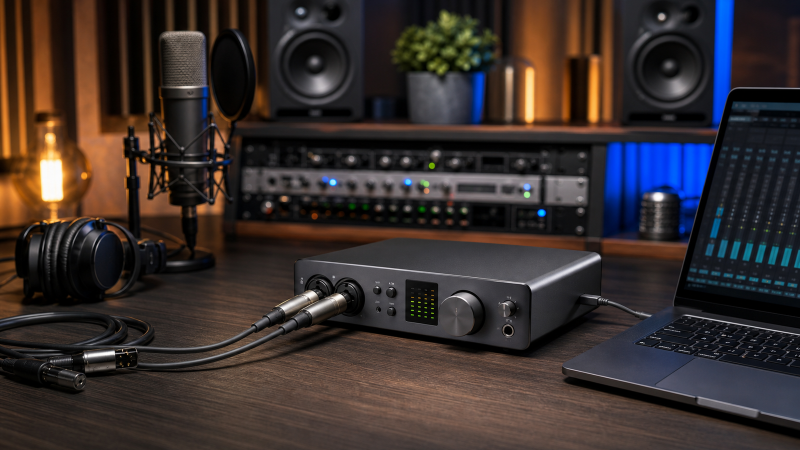
The Universal Audio Apollo Twin X DUO Gen 2 is our first recommendation for a compact Windows recording desk because it combines two preamps, optical expansion, and an interface-side UAD monitoring workflow in one small unit. Larger studios should start with the Focusrite Red 8Line for Dante and Pro Tools integration or the Lynx Aurora(n) 8-TB3 for dedicated eight-channel line conversion. The right purchase still begins with the computer, not the headline input count. Confirm the host controller, vendor driver, operating system, cable, authorization process, and monitoring path before you compare preamps.
We rebuilt this guide around five exact retail models from five brands. Every pick has a current manufacturer product or support path and an active US New offer at the July 21 research cutoff. We treat Thunderbolt as a transport standard, not as another name for the USB-C connector. We also keep maximum I/O totals separate from analog microphone inputs and attribute performance language to the company that published it.
Table of Contents
What changed in this July 21, 2026 update?
This is a full five-brand rebuild of the existing guide, not a product-count expansion. We removed the repetitive 2022 slate and froze one exact model each from Universal Audio, Focusrite, PreSonus, Antelope Audio, and Lynx. We also added explicit Windows driver boundaries, monitoring-path explanations, digital expansion limits, and cable checks. The evidence cutoff is July 21, 2026, so confirm any later driver or OS change with the manufacturer.
Quick picks
- Best desktop DSP workflow: Universal Audio Apollo Twin X DUO Gen 2. Pick it for a compact two-preamp desk and UA Console monitoring. On Windows, it still needs a compatible Thunderbolt system, current UAD software, authorization, and the cable type in UA’s matrix.
- Best for Red, Dante, and Pro Tools studio integration: Focusrite Red 8Line. Pick it when your room needs line I/O plus network, optical, and DigiLink paths. Focusrite documents 64-bit Windows 10/11 for this Thunderbolt 3 model, but its maximum channel count changes with mode and sample rate.
- Best direct-to-DAW rack value: PreSonus Quantum 2626. Pick it for eight preamps and broad optical expansion without an onboard plug-in platform. The reviewed product sources establish Windows 10 setup, not a Windows 11 floor.
- Best multi-preamp onboard-effects hub: Antelope Audio Orion Studio Synergy Core. Pick it when twelve preamps and Antelope’s onboard processing fit your tracking plan. On Windows, Antelope’s Thunderbolt driver is ASIO-only, native Windows Audio is not supported, and Thunderbolt 4 breadth remains system-dependent.
- Best modular converter/interface: Lynx Aurora(n) 8-TB3. Pick the exact eight-channel line-level configuration for a professional rack. Lynx publishes current Windows PCIe/Thunderbolt ASIO drivers, but the reviewed sources establish no precise Windows 10 or 11 floor.
| Image | Product | Details | Check Price |
|---|---|---|---|
 | Universal Audio Apollo Twin X DUO Gen 2 | Form factor: Desktop interface Thunderbolt transport: Thunderbolt 3; UA documents supported TB3/TB4 Windows hosts with an approved TB3, TB4, or certified USB4 cable Stable I/O role: 10-in/6-out aggregate with two analog preamps and optical expansion Mic preamps: 2 Unison-capable preamps Monitoring/DSP path: Console and onboard UAD DUO processing; plug-in bundle and DSP capacity are package and session dependent Digital expansion: Optical ADAT or S/PDIF Windows/driver boundary: Supported Windows 10/11 path requires compatible Thunderbolt hardware, current UAD software, authorization, and controller setup Important limitation: Do not substitute the USB model or a generic USB-C cable; this is the DUO Gen 2 Essentials configuration Best for: Compact desktop recording with an interface-side UAD monitoring workflow | Check Price on Amazon |
 | Focusrite Red 8Line | Form factor: Rackmount Thunderbolt transport: Thunderbolt 3; Focusrite says Red 8Line should function on its supported TB4 Windows path Stable I/O role: Large studio router and converter; the 58-in/64-out maximum combines several digital and host paths Mic preamps: 2 Red Evolution preamps Monitoring/DSP path: Software routing and DAW plug-in monitoring through the Focusrite driver; no onboard effects claim Digital expansion: Dante, ADAT, S/PDIF, Mini DigiLink, word clock, and Loop Sync, subject to mode and sample rate Windows/driver boundary: Focusrite documents 64-bit Windows 10/11 for Red 8Line on a Thunderbolt 3 computer Important limitation: Maximum channel totals are not all analog and are not simultaneous in every sample-rate or connection mode Best for: Studios joining Thunderbolt, Dante, and Pro Tools HD workflows | Check Price on Amazon |
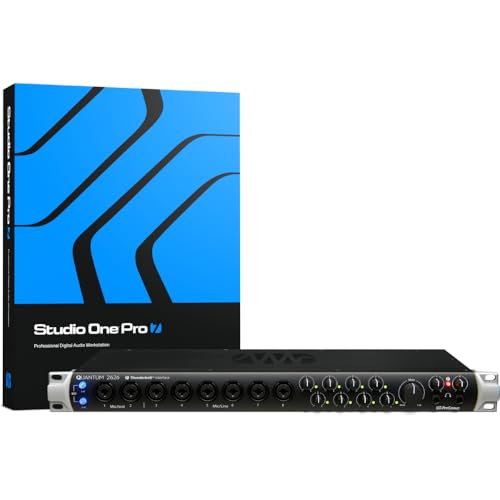 | PreSonus Quantum 2626 | Form factor: Rackmount Thunderbolt transport: Thunderbolt 3 over a USB-C-shaped connector; no USB data mode is established Stable I/O role: 26-in/26-out maximum at 44.1 or 48 kHz with analog and digital paths combined Mic preamps: 8 XMAX preamps Monitoring/DSP path: Direct-to-DAW driver workflow; no onboard plug-in DSP claim Digital expansion: ADAT, stereo S/PDIF, MIDI, and word clock; ADAT count falls above base sample rates Windows/driver boundary: PreSonus documents Windows 10 setup for this model; Windows 11 is not established Important limitation: PreSonus latency language is conditional; verify Windows 11 and host-controller support before buying Best for: A rack with eight preamps and direct DAW monitoring value | Check Price on Amazon |
 | Antelope Audio Orion Studio Synergy Core | Form factor: Rackmount Thunderbolt transport: Thunderbolt 3 plus a distinct USB 2.0 mode; TB4 breadth is conditional by system Stable I/O role: 14-in/24-out studio hub with different Thunderbolt and USB host channel behavior Mic preamps: 12 discrete preamps Monitoring/DSP path: Onboard Synergy Core DSP/FPGA effects and routing; licenses, bundle, and processing capacity apply Digital expansion: ADAT, S/PDIF, and word clock within documented sample-rate and routing limits Windows/driver boundary: Windows 10/11 Thunderbolt driver is ASIO-only; native Windows Audio is not supported Important limitation: Driver 1.55 warns TB4 compatibility varies and permits one Antelope Thunderbolt device at a time Best for: A multi-preamp rack centered on onboard Antelope effects | Check Price on Amazon |
 | Lynx Aurora(n) 8-TB3 | Form factor: Rackmount Thunderbolt transport: Exact eight-channel Aurora(n) base with two-port LT-TB3 Thunderbolt 3 card Stable I/O role: 8-channel analog converter/interface with one DB25 input and one DB25 output connector Mic preamps: None in the exact 8-TB3 configuration Monitoring/DSP path: NControl routing plus two headphone outputs; no included onboard effects claim Digital expansion: Word clock and onboard microSD recorder; ADAT and other I/O modules are not included Windows/driver boundary: Lynx publishes current PCIe/Thunderbolt ASIO drivers but names no exact Windows-version minimum Important limitation: Do not assume larger analog bases, preamps, ADAT, Dante, Pro Tools HD, or another LSlot card Best for: Eight-channel line-level conversion in a modular professional rack | Check Price on Amazon |
Which interface fits your workflow?
| Choose this | If you need this |
|---|---|
| Apollo Twin X DUO Gen 2 | A small desktop controller with two preamps and UAD Console monitoring |
| Red 8Line | A rack that connects Thunderbolt, Dante, ADAT, S/PDIF, and Mini DigiLink systems |
| Quantum 2626 | Eight preamps and a direct DAW workflow at base sample rates |
| Orion Studio | Twelve preamps and an Antelope effects and routing environment |
| Aurora(n) 8-TB3 | Eight channels of line conversion with an exact Thunderbolt 3 LSlot card |
1. Universal Audio Apollo Twin X DUO Gen 2: Best desktop DSP workflow

The Apollo Twin X DUO Gen 2 is the easiest recommendation here for a singer, instrumentalist, producer, or voice artist who wants the interface within arm’s reach. Universal Audio describes the Thunderbolt version as a 10-in/6-out, 24-bit/192 kHz desktop interface. That total combines its analog and optical paths. The hardware centers on two Unison-capable microphone preamps, a front Hi-Z input, monitor and line outputs, a headphone output, and optical ADAT or S/PDIF expansion.
The decisive feature is not the raw total. UA Console can route monitoring and supported UAD plug-ins through the interface’s DUO processing instead of sending every monitored effect through the DAW buffer. UA presents this as its real-time recording workflow. It is not our latency measurement, and capacity depends on the DUO processor, plug-in choice, sample rate, routing, and the Essentials software entitlement tied to this exact retail package. Do not apply QUAD processing or a Heritage bundle to this model.
Windows support is specific enough to act on. UA’s current setup guidance covers compatible 64-bit Windows 10 and Windows 11 computers with supported Apollo Thunderbolt hardware and current UAD software. It also requires a functioning Thunderbolt controller, system updates, device authorization, and appropriate power-management settings. UA’s cable matrix maps the current Apollo X desktop family to Windows Thunderbolt 3 and Thunderbolt 4 hosts with no adapter when you use a supported Thunderbolt 3, Thunderbolt 4, or USB-IF Certified USB4 cable. UA recommends connecting directly and keeping that data cable at two meters or less.
That last sentence is why a random charge cable is a bad troubleshooting plan. USB-C only describes the plug. The Apollo Twin X Thunderbolt model also has a separately named USB relative, and its host path is not interchangeable. Read our Thunderbolt 3, 4, and 5 comparison if the logos and generations on a new PC are unclear.
Our Take
Choose the Apollo Twin X DUO Gen 2 when two local preamps cover most sessions and the UA Console ecosystem is a feature you actively want. Skip it if you need eight microphone inputs in the chassis, prefer only native DAW plug-ins, or do not want software authorization to be part of the recording setup.
- Compact desktop controls stay within reach during solo recording
- Two Unison preamps plus optical ADAT or S/PDIF expansion
- UA documents Windows 10/11 and supported TB4 host paths
- Console offers an interface-side UAD monitoring route
- Only two onboard microphone preamps
- DUO resources and Essentials entitlements limit the plug-in workflow
- Required data cable is not proven included in every package
Key specifications: desktop; Thunderbolt 3; two Unison preamps; optical ADAT or S/PDIF; 10-in/6-out aggregate; DUO UAD processing.
2. Focusrite Red 8Line: Best for Red, Dante, and Pro Tools integration
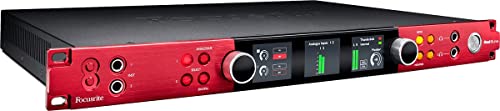
Focusrite Red 8Line is the strongest choice in this list for a room that has grown beyond one computer and a pair of microphone inputs. Focusrite calls it a 58-input/64-output Thunderbolt 3 interface, but that is a routing ceiling assembled from several systems. The chassis has two Red Evolution mic preamps, eight balanced analog line inputs and outputs on DB25, ADAT, stereo S/PDIF, up to 32-by-32 Dante, Mini DigiLink, word clock, and Loop Sync.
Those paths solve different jobs. The two front preamps handle local sources. The DB25 connections integrate outboard preamps, a console, or a patch bay. ADAT and S/PDIF add conventional digital gear. Dante connects networked audio, while Mini DigiLink serves supported Pro Tools HD workflows. Focusrite’s manual controls which routes appear in each host mode, how clocking works, and how channel availability changes as sample rate rises. The maximum should never be read as 58 analog inputs or as a promise that every route operates together at every sample rate.
The current Windows boundary is clearer than it is for several competitors. Focusrite’s February 9, 2026 compatibility note covers Red 8Line and Red 16Line on 64-bit Windows 10 and Windows 11 with a computer that has Thunderbolt 3. It says these Thunderbolt 3 products should function through the supported Thunderbolt 4 route. The same note separates older Red 4Pre and Red 8Pre hardware because those models use Thunderbolt 2 and carry a different Thunderbolt 4 boundary.
Focusrite markets its driver for low-latency DAW plug-in monitoring. We do not convert that into a number. The resulting round trip still depends on the selected buffer, sample rate, session load, plug-ins, DAW, driver, and computer. Dante and Pro Tools HD also bring their own network, cabling, licensing, clock, and configuration work. Red 8Line is a systems interface, not a one-cable substitute for planning the rest of the rack.
Our Take
Choose Red 8Line when you can name the Dante, DigiLink, optical, and line-level routes your studio will use. Its value comes from connecting those systems coherently. Skip it for a simple two-microphone desktop, or if you would leave most of its professional routing unused.
- Combines Thunderbolt, Dante, DigiLink, optical, and analog studio paths
- Two Red Evolution preamps for local recording
- Focusrite documents 64-bit Windows 10 and Windows 11
- Current support note distinguishes the older Thunderbolt 2 models
- Headline totals vary by sample rate and connection mode
- Only two mic preamps are built into the chassis
- Dante and DigiLink require additional system planning
Key specifications: Rackmount; Thunderbolt 3; two Red Evolution preamps; eight line inputs and outputs; Dante, ADAT, S/PDIF, and Mini DigiLink.
3. PreSonus Quantum 2626: Best direct-to-DAW rack value

The Quantum 2626 is the practical eight-preamp rack in this group. PreSonus identifies it as a 26-input/26-output, 24-bit/192 kHz Thunderbolt 3 interface. Its eight XMAX preamps give a band, drum setup, or multi-person session more local recording inputs than either desktop Apollo or Red 8Line. Inputs one and two accept microphone or instrument sources and include direct-out and return paths; inputs three through eight accept microphone or line signals.
The full 26-by-26 count applies at 44.1 or 48 kHz and combines the eight analog channels with digital expansion. PreSonus specifies sixteen ADAT channels at those base rates, falling to eight at 88.2 or 96 kHz. Stereo S/PDIF, MIDI, and word clock serve separate expansion and sync roles. Do not assume the full optical count at every rate, and do not describe all 26 inputs as microphone preamps.
Quantum 2626 follows a direct DAW model instead of adding an onboard plug-in processing environment. PreSonus publishes an “as low as” latency statement for its proprietary-driver setup, but that is the manufacturer’s conditional result, not ours. Buffer size, sample rate, DAW, driver, monitoring route, session load, and computer all affect what a user will experience. The useful editorial distinction is simpler: buy it if you want eight preamps and plan to monitor through a tuned DAW session, not because a marketing number promises the same result on every PC.
The Windows evidence needs a bright line. The exact PreSonus product-specific setup article covers Windows 10. It tells users to install Universal Control, authorize the Thunderbolt device, update controller or add-in-card firmware, check the BIOS, and select an appropriate power plan. The reviewed source set does not contain an exact current source that establishes Windows 11 for Quantum 2626. A current download button or a Windows 11 article for a different product is not enough. If your studio PC runs Windows 11, get exact written confirmation for Quantum 2626 and your host controller before buying.
The port’s shape can also mislead. PreSonus says this interface carries Thunderbolt 3 through a USB-C physical connector. That does not establish fallback operation over ordinary USB data mode, and current USB Quantum HD or ES compatibility material cannot be borrowed for this older Thunderbolt model. Our USB4 explainer covers the newer host standard, but the PreSonus evidence still controls this device.
Our Take
Choose Quantum 2626 for eight preamps, useful optical expansion at base sample rates, and a recording plan centered on native DAW processing. Skip it on Windows 11 until PreSonus confirms the exact interface, OS build, and controller combination. This is a good hardware role with a deliberately conditional Windows boundary.
- Eight XMAX preamps support full-band and drum sessions
- Sixteen ADAT channels at base sample rates
- Direct DAW design avoids an added effects ecosystem
- MIDI, S/PDIF, and word clock broaden studio integration
- Product-specific evidence establishes Windows 10 only
- ADAT channel count falls at higher sample rates
- No onboard plug-in DSP monitoring platform
Key specifications: Rackmount; Thunderbolt 3; eight XMAX preamps; 26-by-26 maximum at 44.1 or 48 kHz; ADAT, S/PDIF, MIDI, and word clock.
4. Antelope Audio Orion Studio Synergy Core: Best multi-preamp effects hub

Orion Studio suits a tracking room that wants many microphone inputs and an interface-side effects environment in the same rack. Antelope describes it as a 14-input/24-output interface with twelve discrete preamps, monitor and headphone outputs, optical and S/PDIF digital connections, word clock, and onboard processing. The host can connect through Thunderbolt 3 or a separate USB 2.0 mode.
Antelope lists six DSP and two FPGA processors and an included effects collection for this product line. Those are manufacturer specifications, not a promise that every optional effect is licensed or that every session can run unlimited instances. Bundle, license, routing, sample rate, and processor resources determine what is available. The interface-side path can keep supported processing out of the DAW’s native plug-in round trip, while DAW monitoring remains subject to the Windows driver and host buffer.
The Windows limitation is decisive. Antelope’s Thunderbolt driver 1.55 supports DAW work through ASIO only. Antelope explicitly says native Windows Audio is not supported through that driver and suggests third-party routing software for that separate use. The same driver permits one Antelope Thunderbolt device at a time. If you need browser audio, system alerts, conferencing, or a non-ASIO application through the interface, design and validate that route before purchase.
Thunderbolt 4 is conditional too. Antelope names a tested Thunderbolt 4 computer configuration and notes reports from other systems, but it warns that compatibility varies. That is evidence for a limited path, not universal Thunderbolt 4 support. Antelope also requires an Apple-certified Thunderbolt 3 or Thunderbolt 4 cable. The current box list names a USB cable but not a Thunderbolt cable, so budget and source the correct data cable separately.
Do not compare Thunderbolt and USB mode only by connector convenience. Antelope states up to 32 host channels over Thunderbolt and up to 24 over USB 2.0, and the modes use different drivers. The broader support material explains that computer configuration, interrupts, DPC behavior, scheduling, other drivers, applications, sample rate, and buffer affect achievable latency. An older numeric Antelope test used a different interface, so it is not evidence for Orion Studio.
Our Take
Choose Orion Studio if twelve preamps and Antelope’s onboard effects and routing are central to the studio plan. Skip it if native Windows Audio is required, if you need two Antelope Thunderbolt devices on one host, or if your Thunderbolt 4 computer is outside a configuration Antelope will confirm.
- Twelve discrete preamps cover larger tracking sessions
- Onboard DSP and FPGA resources support Antelope effects routing
- Thunderbolt and USB host modes offer distinct connection plans
- ADAT, S/PDIF, word clock, monitor, and headphone paths
- Windows Thunderbolt operation is ASIO-only
- Thunderbolt 4 breadth varies by computer configuration
- Thunderbolt cable is not listed in current box contents
Key specifications: Rackmount; Thunderbolt 3 and distinct USB 2.0 modes; twelve preamps; 14-in/24-out physical role; onboard DSP/FPGA platform; ASIO-only Windows Thunderbolt driver.
5. Lynx Aurora(n) 8-TB3: Best modular converter/interface
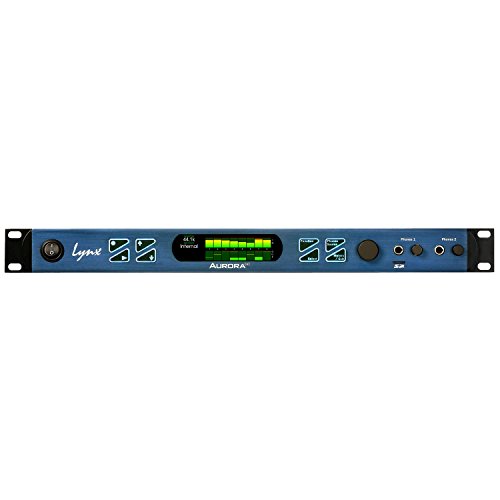
Aurora(n) 8-TB3 is the specialist pick. The exact retail identity combines the eight-channel Aurora(n) analog base with Lynx’s two-port LT-TB3 Thunderbolt 3 LSlot card. The base has one DB25 analog input connector, one DB25 analog output connector, two independent headphone outputs, word-clock I/O, and an onboard 32-channel microSD recorder. It is a line-level converter and interface, not an eight-preamp recording box.
That exactness matters because Aurora(n) is a configurable family. Lynx sells 8, 16, 24, and 32-channel analog bases and lists mic preamp, digital I/O, Dante, Pro Tools HD, and other computer-connection choices across the family. None of those options should be assumed in this 8-TB3 listing. The included connection identity is LT-TB3, and the base analog count is eight. There is no included microphone preamp module, ADAT module, Dante card, Pro Tools HD card, or second computer card in the evidence for this ASIN.
The LT-TB3 card supplies two Thunderbolt 3 ports and supports a Thunderbolt daisy-chain topology for Aurora(n) and Hilo hardware. Raw transport bandwidth is not a recording-performance result. For software control, Lynx says NControl handles Aurora(n) functions and routing. Its current downloads page lists Windows PCIe/Thunderbolt driver material, including V2 and multi-client ASIO V3 entries from May 2025, plus 2026 firmware and NControl updates.
The reviewed sources do not state an exact minimum Windows 10 or Windows 11 release for this configuration. That means we can say Lynx maintains a Windows PCIe/Thunderbolt ASIO path, but we cannot promise a precise OS floor. A buyer should send Lynx the full host-controller model, Windows build, DAW, and planned chain and ask which current driver applies. That is especially important if the interface will sit behind another Thunderbolt device.
Aurora(n) 8-TB3 makes the most sense when a studio already owns preamps, uses a patch bay or console, and wants eight line-level conversion channels in a professional rack chassis. It makes less sense as a first interface for a vocalist who expects XLR preamps in the box. Modularity can protect a chassis investment, but optional modules are separate hardware decisions, not free features included here.
Our Take
Choose the exact Aurora(n) 8-TB3 for eight-channel line conversion and the current LT-TB3 connection. Skip it if you need included microphone preamps or ADAT today. Buy the configuration on the invoice, not the wider Aurora(n) family’s potential options.
- Exact eight-channel line-level converter configuration
- Two-port LT-TB3 card supports Thunderbolt chain planning
- Two headphone outputs and onboard microSD recorder
- Current Lynx driver, firmware, and NControl material
- No microphone preamps in the exact configuration
- ADAT, Dante, and DigiLink hardware are not included
- Reviewed sources provide no precise Windows-version floor
Key specifications: Rackmount; eight-channel analog base; LT-TB3 two-port Thunderbolt 3 card; two headphone outputs; word clock; onboard microSD recorder.
What should you look for in a Thunderbolt audio interface?
Verify transport, not the connector shape
USB-C is the reversible connector on many current computers. It does not tell you which data protocol is active. A port may carry USB, DisplayPort, Thunderbolt, or several modes, while a cable with the same plug can be charge-only, USB, certified USB4, or Thunderbolt. An interface that requires PCIe tunneling over Thunderbolt will not become a USB interface because the plug fits.
Start with the computer maker’s exact port specification and controller. Then compare it with the interface maker’s Windows support page. If the PC advertises USB4, read the practical USB4 versus Thunderbolt 4 differences before assuming the optional and required features are the same. The interface vendor’s driver qualification remains the final gate.
Treat Thunderbolt 3 on Thunderbolt 4 as vendor-specific
Thunderbolt 4 was designed with backward compatibility, but audio drivers, older device controllers, authorization tools, and PC implementations add product-specific limits. UA maps its current Apollo X desktop hardware to supported Windows Thunderbolt 4 hosts through a specified cable path. Focusrite says Red 8Line should function in its supported path. Antelope reports a tested configuration and warns that other Thunderbolt 4 systems can vary. The reviewed PreSonus sources do not establish Windows 11, and Lynx does not give us a precise OS floor.
This is why a broad statement such as “all Thunderbolt 3 interfaces work on Thunderbolt 4” is not useful buying advice. Compare the exact device to the exact host. If you are also planning a new workstation generation, our Thunderbolt 5, Thunderbolt 4, and USB4 guide will help identify the host features, but it cannot replace vendor approval.
Understand ASIO and Windows Audio as different paths
ASIO is the vendor-driver path most Windows DAWs use for low-buffer multichannel recording. Windows Audio and WDM serve system applications, browsers, games, communication tools, and some music software. An interface may expose both, expose them differently, or support only ASIO through a particular transport.
Antelope is the clearest example in this slate: its Windows Thunderbolt driver is ASIO-only and does not natively support Windows Audio. That can be fine in an ASIO DAW room, but it changes streaming, conferencing, and desktop-audio routing. Focusrite, UA, PreSonus, and Lynx each have their own driver and software path. Do not assume that successful DAW playback proves every Windows application can share the device.
Choose the monitoring path before chasing a latency number
There are three useful monitoring routes. Direct monitoring sends an input to an interface output internally, often with minimal mixing. DSP or effects monitoring also stays in the interface but applies supported onboard processing. DAW monitoring sends audio through the vendor driver, host buffer, DAW, plug-ins, and back to the interface.
UA Console and Antelope’s effects system are interface-side processing environments with their own licensing, routing, and resource boundaries. Quantum 2626 emphasizes the direct-to-DAW route. Red 8Line uses its driver and routing software for the larger studio system. Aurora(n) uses NControl for its documented routing role without an included effects package claim.
Buffer size and sample rate affect DAW round trips. A smaller buffer can reduce time in the host path but increases CPU scheduling pressure. A higher sample rate changes buffer duration and can reduce available digital channels while increasing processing and storage demands. Driver quality, DPC behavior, plug-in lookahead, session load, clocking, and the monitoring route also matter. Manufacturer latency statements describe specific conditions; they are not a universal ranking.
Separate analog recording inputs from expansion totals
Count the sources you can connect today. Apollo Twin X has two local preamps. Red 8Line has two preamps plus eight line paths. Quantum 2626 has eight preamps. Orion Studio has twelve preamps. Aurora(n) 8-TB3 has eight line-level conversion channels and no included mic preamps.
Then count the digital paths your existing equipment can actually feed. ADAT requires compatible optical gear and loses channels at higher sample rates. S/PDIF is a stereo digital path. Dante requires network design, compatible endpoints, and software. Mini DigiLink belongs to an appropriate Pro Tools HD system. Word clock synchronizes devices but does not add an audio input by itself. Optional modules are not included merely because a chassis can accept them.
This distinction prevents the most common disappointment in this category: buying a large headline number and discovering that only a small portion accepts microphones without additional preamps and converters.
Decide between onboard effects and native CPU processing
Onboard processing can make a tracking template repeatable and keep supported monitoring effects outside the DAW buffer. That is the core attraction of UA’s UAD DUO/Console route and Antelope’s effects platform. It also creates an ecosystem decision. Plug-in licenses, included bundles, processor capacity, routing software, and future support become part of the interface purchase.
Native DAW processing offers a broader choice of plug-ins and uses the computer CPU, but monitored sessions must be tuned for a stable buffer. Quantum 2626 is the clearest native-first option here. Red 8Line also targets a DAW and larger routed studio rather than selling an included onboard effects collection. Lynx focuses the exact 8-TB3 package on conversion, routing, and connectivity. Neither approach is automatically better. Pick the signal path you can operate reliably.
Match desktop and rack hardware to the room
A desktop interface makes monitor level, headphone volume, and one or two source inputs easy to reach. Apollo Twin X fits a producer, editor, or small booth where the person recording also controls the session. A rack interface is better when cables terminate at a patch bay, several performers record together, or equipment stays wired.
Quantum 2626 and Orion Studio put eight or twelve preamps in a rackmount chassis. Red 8Line makes sense near network, optical, line, and Pro Tools connections. Aurora(n) 8-TB3 suits a line-level conversion rack built around separate preamps. If you need a computer too, shortlist Thunderbolt 3 laptops with clearly documented ports and still run the interface maker’s compatibility check.
Audit cables, adapters, and chain position
A certified cable is part of the signal path. UA specifies supported Thunderbolt or certified USB4 cable types for current Apollo X desktop hardware and recommends a direct, two-meter-or-shorter connection. Antelope requires an Apple-certified Thunderbolt 3 or 4 cable. Other products may have their own active/passive and length requirements. Our Thunderbolt 4 cable guide helps with labels, while the USB-C cable guide explains why connector appearance is insufficient.
Avoid an adapter chain until the interface maker approves the exact route. Put the audio interface directly on the host during initial setup. Add docks, displays, storage, and daisy-chained devices one at a time. Bus order can affect available bandwidth, device enumeration, and troubleshooting even when raw Thunderbolt bandwidth appears ample.
Windows pre-purchase compatibility checklist
Use this checklist before the return window starts:
- Record the exact interface suffix. Distinguish Thunderbolt and USB relatives, bundle variants, processor tiers, and modular configurations.
- Identify the PC port and controller. Use the PC manual, Device Manager, and vendor specification rather than the connector shape. If needed, follow our guide to detecting USB and port versions in Windows.
- Match the operating system exactly. Note edition, 64-bit status, version, and build. PreSonus evidence here covers Windows 10 only; the reviewed Lynx sources provide no exact floor.
- Find the exact vendor driver page. Confirm that the model, transport, OS, and controller generation appear together. Save the installer and release notes before disconnecting the old interface.
- Check BIOS, firmware, and authorization. Update only through the computer or interface maker’s supported process. UA and PreSonus explicitly require Thunderbolt setup and authorization steps.
- Confirm the application path. Ask whether your DAW uses ASIO and whether browsers, meetings, or streaming software need Windows Audio. Antelope’s Thunderbolt driver does not natively supply the latter.
- Specify the cable. Match certification, generation, length, and connector. Do not assume the box includes a suitable Thunderbolt cable.
- List every expansion path. Include optical format, sample rate, clock source, network hardware, DigiLink licensing, DB25 pinout, and any optional module.
- Plan the first boot. Connect the interface directly, install the approved software, authorize it, confirm firmware, select it in the DAW, and test one input and output before adding other Thunderbolt devices.
- Get uncertain combinations in writing. Send the manufacturer the PC model, controller, OS build, interface suffix, driver, cable, DAW, and chain order. Keep the response with the purchase record.
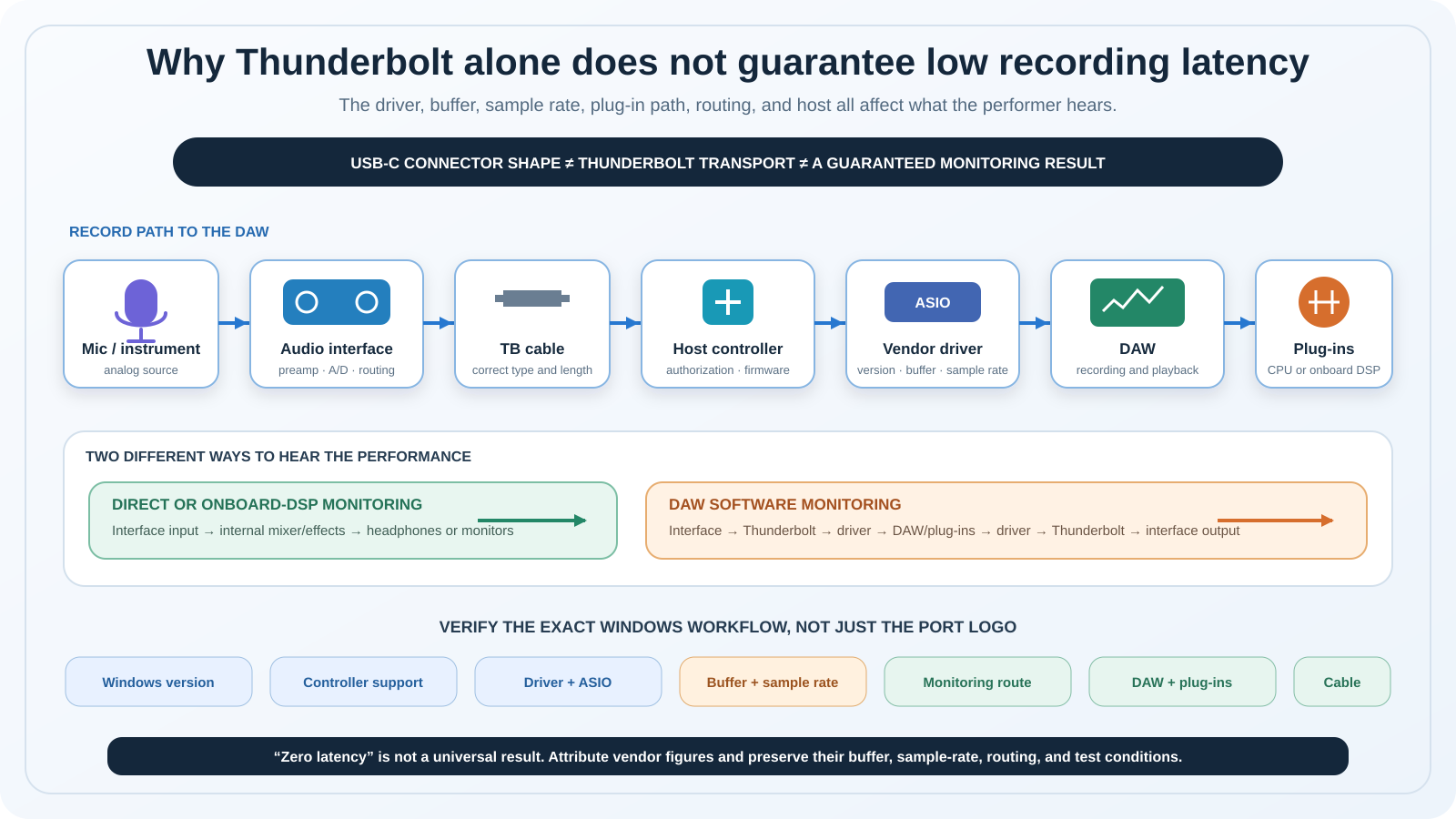
Windows Thunderbolt audio signal and monitoring paths
The source begins at a microphone or instrument, passes through the selected preamp and converter, and enters the interface routing system. From there, a direct or DSP branch can feed the monitor outputs inside the interface. That branch may avoid the DAW buffer, but it still depends on the interface mixer, DSP resources, routing, plug-in licenses, and conversion path.
The DAW branch travels from the interface through the Thunderbolt cable, PC host controller, vendor ASIO driver, host buffer, DAW, and any plug-ins. It returns through the driver to the interface outputs. Cable certification, controller firmware, authorization, driver behavior, buffer size, sample rate, CPU scheduling, DAW settings, and plug-ins can each constrain that route.
Frequently asked questions
Is Thunderbolt better than USB for an audio interface?
Not by name alone. Thunderbolt provides a PCIe-based transport and supports capable multichannel interfaces, but a well-designed USB interface can also deliver dependable recording. Driver quality, routing, monitoring, buffer stability, preamps, conversion, and vendor support matter more than the logo by itself. Buy Thunderbolt when the exact interface features and verified host path fit your studio. Do not replace a stable USB setup solely because another connector advertises more raw bandwidth.
Will a Thunderbolt 3 audio interface work on a Thunderbolt 4 PC?
Sometimes, with exact vendor support. UA documents a supported current Apollo X desktop route, and Focusrite says Red 8Line should work through its supported Thunderbolt 4 path. Antelope reports a tested configuration but warns that results vary. The reviewed PreSonus and Lynx evidence does not justify a universal promise. Match the interface, Windows build, controller, driver, authorization process, and certified cable before buying.
Does a USB-C port support a Thunderbolt audio interface?
Only if that port implements the Thunderbolt capabilities required by the interface. USB-C describes the connector. It does not prove PCIe tunneling, Thunderbolt authorization, or a qualified audio driver path. Check the computer specification and interface support matrix. A cable also needs the required certification and data capability. A plug that fits can still be the wrong cable or the wrong host protocol.
Do these interfaces work on Windows 11?
UA documents Windows 11 for its supported Apollo Thunderbolt path. Focusrite’s February 2026 note documents 64-bit Windows 11 for Red 8Line. Antelope’s Windows Thunderbolt driver page names Windows 11, while driver 1.55 keeps Thunderbolt 4 compatibility conditional and the path ASIO-only. The exact PreSonus Quantum 2626 source here establishes Windows 10, not Windows 11. Lynx publishes current Windows PCIe/Thunderbolt drivers, but the reviewed sources give no exact OS-version floor. Check again at purchase time.
What is the difference between ASIO and Windows Audio?
ASIO is the vendor-driver route commonly selected inside Windows DAWs for multichannel recording and small-buffer operation. Windows Audio/WDM is a different system path used by many desktop applications. Support can differ by interface and transport. Antelope’s current Thunderbolt driver is explicitly ASIO-only, so native Windows Audio is unavailable through that path. If you combine a DAW, browser, streaming software, and calls, map each application’s audio route before choosing the hardware.
Does Thunderbolt eliminate latency?
No. Audio still passes through conversion, routing, a driver, buffers, the DAW, plug-ins, and output conversion when you monitor through the computer. Direct or onboard DSP monitoring can take a shorter interface-side route for supported signals and effects. The actual timing depends on the chosen path, sample rate, buffer, driver, computer scheduling, plug-ins, and session. Manufacturer figures only apply to the stated test conditions and are not universal results.
Do I need onboard DSP?
You need it only if an interface-side effects workflow solves a real monitoring problem. UA’s UAD system and Antelope’s platform can process supported effects within their respective routing environments, subject to licenses and resources. A native-first interface can be simpler if your computer holds a stable buffer and your preferred plug-ins run in the DAW. Decide from a typical tracking template, not from the processor count alone.
How many inputs can I record at once?
Count active analog sources first, then supported digital channels at your target sample rate. Quantum 2626 reaches its manufacturer-stated 26-by-26 maximum at 44.1 or 48 kHz, while its ADAT count falls at higher rates. Red 8Line’s larger total combines several connection systems and modes. Aurora(n) 8-TB3 is the eight-channel analog configuration without optional preamp or digital modules. Your preamps, converters, cables, clocking, network, DAW, and driver must support the same plan.
Is a Thunderbolt cable included?
Do not assume it. Antelope’s current Orion box list names a USB cable but not a Thunderbolt cable. The reviewed evidence does not establish a suitable Thunderbolt cable in every Apollo, Red, PreSonus, or Lynx retail package either. Check the exact seller package, then match the manufacturer’s certification, generation, and length rule. The correct cable is part of compatibility, not an optional cosmetic accessory.
How we research and select
We began with five exact retail identities that had active US New offers in our ordered July 21 Amazon availability check. We then matched each product to current manufacturer product pages, manuals, driver notes, cable matrices, and downloads. The comparison focuses on claims a buyer can verify: exact transport, analog I/O role, digital expansion, monitoring route, Windows driver boundary, cable condition, and configuration-specific exclusions.
We do not claim personal bench testing or measured latency. Manufacturer latency language is retained only when its source and conditions are clear, and no numeric figure was needed for the recommendations. We also reject family-level feature borrowing. A QUAD Apollo does not define the DUO model, current USB Quantum products do not define Quantum 2626, and optional Aurora(n) modules are not part of the exact 8-TB3 package.
Commerce status is time-sensitive. Every selected ASIN had at least one active US New offer in our July 21 check, but the article does not hardcode price or promise continuing availability. Recheck the ordered product list before any future update.
Exclusions and limitations
We excluded PreSonus Quantum HD8, HD2, ES4, and ES2 because they use USB rather than Thunderbolt. We also excluded Apollo Twin X USB and Apollo Solo USB because their USB host path cannot be borrowed for the Thunderbolt models. Antelope Zen Q Thunderbolt was left out after Antelope’s direct page showed the Thunderbolt and USB versions sold out at the research cutoff, while other Antelope models would duplicate the selected brand.
Lynx Mesa had no approved exact commerce listing. Older MOTU Thunderbolt identities were not mixed with current products. Focusrite Red 4Pre and Red 8Pre remain outside the list because their Thunderbolt 2 Windows and Thunderbolt 4 boundary differs from Red 8Line. Apogee, RME, and other USB-C interfaces were not promoted to Thunderbolt devices based on connector shape.
This guide is a July 21, 2026 evidence snapshot. Driver releases, Windows builds, firmware, bundles, and commerce offers can change. Recheck the exact model and host before purchasing, especially for Quantum 2626 on Windows 11, Orion Studio on an unlisted Thunderbolt 4 PC, and Aurora(n) 8-TB3 where the reviewed sources establish no precise Windows floor.