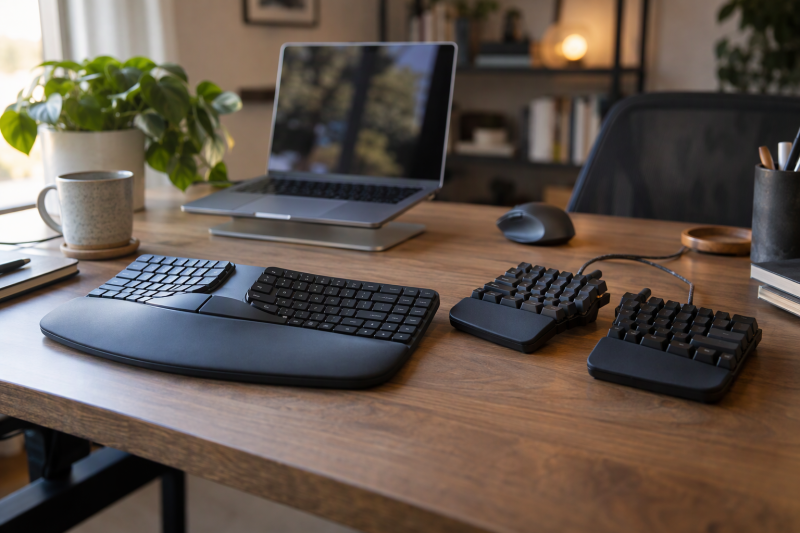
An ergonomic keyboard either curves its keys within one body or places them on two modules that move apart. The five keyboards here, from Logitech, Kinesis, Adesso, Perixx and Arteck, cover both approaches with wired and wireless connections. For programmable mechanical split boards, see our guide to the best programmable split ergonomic mechanical keyboards. No design guarantees comfort or a health outcome, because fit, desk height and personal preference differ.
| Image | Product | Best fit | Layout | Connection | Palm support | Watch-outs | Check Price |
|---|---|---|---|---|---|---|---|
 | Logitech Wave Keys | Switching among devices | Wave-shaped single keyboard | Bluetooth or Logi Bolt receiver | Memory-foam palm rest | No separate halves listed | Check Price on Amazon |
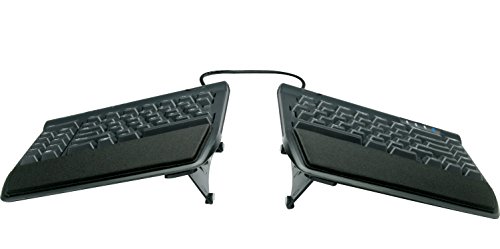 | Kinesis Freestyle2 with VIP3 | Adjustable separate halves | Two modules, up to 9 inches apart per Kinesis | Wired USB-A | VIP3 tenting and palm supports | Windows layout; embedded numeric 10-key | Check Price on Amazon |
 | Adesso AKB-150UB | Simple wired shortcuts | Split key layout | Wired USB | Integrated palm rest | Windows versions listed; no macOS listed | Check Price on Amazon |
 | Perixx PERIBOARD-612B | Windows and Mac modes | One-piece split layout | Bluetooth or 2.4 GHz USB-A receiver | Integrated palm rest | Two AA batteries not included | Check Price on Amazon |
 | Arteck Split Ergonomic Wireless Keyboard | Rechargeable wireless | Split design | 2.4 GHz USB receiver | Cushioned wrist and palm rest | No Bluetooth listed; Windows-focused | Check Price on Amazon |
1. Logitech Wave Keys — Best for Multi-Device Switching
The Wave Keys (Logitech model 920-011898, Graphite) is a wave-shaped one-piece keyboard with a cushioned palm rest, and Logitech says the rest has three layers of memory foam. Logitech’s page lists a Bluetooth connection or the included Logi Bolt receiver, Easy-Switch keys for moving among a laptop, tablet or phone, and two included AAA batteries with up to three years of battery life. The Amazon listing says Easy-Switch covers up to three devices.
Logitech lists Bluetooth support for Windows 10 and 11, macOS 11 or later, iPadOS 14 or later, ChromeOS, Linux and Android 9.0 or later. For the Bolt receiver, Logitech gives Windows, macOS, ChromeOS and Linux and requires an available USB port. The Logi Options+ app sets app-specific shortcuts, and Logitech lists the app for Windows and macOS.
Limit: Logitech describes a wave-shaped single keyboard, and its page does not list separate or adjustable halves.Our Take Choose Wave Keys when your priority is moving one keyboard among a laptop, tablet and phone, and a wave-shaped single body is enough for you.
- Pick either of two connections, since Logitech lists Bluetooth and the included Logi Bolt receiver.
- Logitech lists Easy-Switch keys for moving among devices, and the Amazon listing says they cover up to three devices.
- Your palms get a cushioned rest, and Logitech says it has three layers of memory foam.
- Logitech describes a single wave-shaped body, and its page does not list separate halves for buyers who want to move their hands apart.
- The Bolt receiver takes up a USB port on your computer, and Logitech lists an available port as required.
2. Kinesis Freestyle2 with VIP3 — Best for Separate Adjustable Halves
The Freestyle2 with VIP3 (Kinesis KB820PB-US) joins two key modules with a flexible pivot tether. Kinesis says disconnecting the tether allows up to 9 inches of separation on this version, and a 20-inch version also exists. The VIP3 tenting accessory comes preassembled with integrated palm supports. Kinesis lists slopes of 5, 10 and 15 degrees, with the keyboard standing 1.5, 2.125 and 2.875 inches high at those settings.
Kinesis lists a wired USB Type A keyboard with a 6-foot cable, a Windows layout and a membrane switch with 44 grams of operating force and 3.9 mm of travel. The Amazon listing adds an embedded numeric 10-key. For operating systems, Kinesis lists Windows 7 through 11 and Linux, and says the multimedia and calculator keys do not work on Linux. On its support page, Kinesis says the Freestyle2 is not programmable and points buyers who want a programmable split board to the Freestyle Pro.
Limit: The Amazon listing describes a USB keyboard with an embedded numeric 10-key rather than a separate number pad.Our Take Choose the Freestyle2 when placing the modules independently and adjusting the tenting are good enough reasons to accept a wired keyboard.
- To move the modules apart, disconnect the pivot tether, and Kinesis says they can separate up to 9 inches.
- You get adjustable VIP3 tenting and integrated palm supports on the KB820PB-US, and Kinesis lists 5, 10 and 15 degrees.
- Kinesis lists a 44 gram operating force and 3.9 mm of travel for its membrane switch, two figures for comparing key feel with another keyboard.
- Expect a cable to your computer, since the Amazon listing describes a wired USB-A connection.
- For number entry, the Amazon listing describes an embedded numeric 10-key rather than a separate number pad.
3. Adesso AKB-150UB — Best for a Simple Wired Layout
According to the Amazon listing, the AKB-150UB is a USB keyboard with 105 keys in a US layout. The listing also describes a split key layout, a curved shape and an integrated palm rest, and gives the dimensions as 21.1 by 10.2 inches.
The Amazon listing gives 13 internet hotkeys and 7 media hotkeys, plus a plug-and-play USB connection for Windows 2000, XP, Vista, 7, 8, 10 and 11. It does not list macOS, Bluetooth or separate halves.
Limit: The Amazon listing names Windows versions and does not list macOS or separate halves.Our Take Pick the AKB-150UB when you want a wired keyboard with a palm rest and dedicated internet and media keys.
- The Amazon listing gives Adesso’s keyboard 13 internet hotkeys and 7 media hotkeys, dedicated keys for internet and media tasks.
- Palm support is built in, as the Amazon listing describes an integrated palm rest for Adesso’s keyboard.
- Setup over USB is plug and play on the Windows versions the Amazon listing names for Adesso’s keyboard.
- The Amazon listing does not list separate or adjustable halves for Adesso’s keyboard, a gap for buyers who want to adjust their hand spacing.
- The Amazon listing names Windows versions and does not list macOS, leaving Adesso’s Mac support unconfirmed.
4. Perixx PERIBOARD-612B — Best for Windows and Mac Modes
The PERIBOARD-612B is a one-piece split-key keyboard with curved rows and an integrated palm rest, according to the Amazon listing. Perixx lists a 2.4 GHz receiver with a USB-A connector and Bluetooth 4.2, with a switch on the bottom of the keyboard for changing between the two. The Amazon listing adds a bottom switch for Windows and Mac systems, four additional Mac or Windows keys and a key puller.
Perixx lists Windows 7 or higher and macOS Monterey 12.2 or higher as fully compatible. It also lists membrane switches, two AA batteries and a size of 485 by 236 by 43 millimeters, about 19.1 by 9.3 by 1.7 inches. The Amazon listing says the batteries are not included and gives key travel as 4.2 mm, while the comparison table on Perixx’s page gives 3.8 mm for the 612B.
Limit: Perixx lists two AA batteries, and the Amazon listing says they are not included.Our Take Choose the PERIBOARD-612B when a one-piece split-key board fits your desk and you want Bluetooth or a 2.4 GHz receiver, plus a switch between Windows and Mac layouts.
- Perixx lists Bluetooth and a 2.4 GHz receiver as two wireless choices, and the Amazon listing says the receiver stores in the keyboard compartment.
- Check your computer against Windows 7 or higher and macOS Monterey 12.2 or higher, which Perixx lists as fully compatible.
- Four additional Mac or Windows keys and a key puller come with the keyboard, according to the Amazon listing.
- Have two AA batteries ready, since Perixx lists them and the Amazon listing says they are not included.
- Allow more desk width than for the Arteck. Perixx lists 485 mm, about 19.1 inches, across, and the Amazon listing gives 16.5 inches for the Arteck.
5. Arteck Split Ergonomic Wireless Keyboard — Best for Rechargeable Wireless
According to Arteck, the Arteck Split Ergonomic Wireless Keyboard (model HW315) has a split design and a cushioned wrist and palm rest. The keyboard connects through a nano USB receiver stored at the back of the keyboard, and Arteck says it works up to 33 feet from the receiver. Arteck also lists four built-in foldable legs for choosing a typing angle.
Arteck says the rechargeable lithium battery lasts 6 months per charge, based on two hours of use per day, and the box includes a USB-C charging cable. Arteck and the Amazon listing describe the keyboard for Windows computers, and Arteck lists Windows-dedicated hot keys. Neither Arteck nor the Amazon listing lists Bluetooth. The Amazon listing gives the size as 16.5 by 9.6 inches.
Limit: Arteck describes a 2.4 GHz USB receiver connection and does not list Bluetooth, and its six-month figure is based on two hours of use per day.Our Take Pick the Arteck when you want a rechargeable split-design keyboard and its USB receiver fits your computer’s ports.
- Arteck includes a USB-C cable in the box for charging the rechargeable lithium battery.
- Your wrists and palms have somewhere soft to rest, and Arteck describes the rest as cushioned.
- You choose a typing angle with the four built-in foldable legs Arteck lists.
- Your computer needs a port for the 2.4 GHz nano USB receiver Arteck lists, and Arteck does not list Bluetooth.
- Compare your daily typing hours with the two hours of use per day behind Arteck’s six-month battery figure.
Buying Guide: Choosing an Ergonomic or Split Keyboard
Understand fixed and separate layouts
A split key layout in one body places left and right key zones at an angle within a single keyboard. The Amazon listing for the Perixx PERIBOARD-612B calls the keyboard a one-piece split layout. The Amazon listings for the Adesso AKB-150UB and the Arteck describe split designs and do not list separate halves. Logitech describes the Wave Keys as a wave-shaped keyboard and does not list separate halves.
The Kinesis Freestyle2 has two modules joined by a pivot tether, and Kinesis says disconnecting the tether allows up to 9 inches of separation. Kinesis lists a width of 15.375 inches with the modules together and 23.5 inches at full 9-inch separation. Decide whether separate placement or a single body suits the way you type.
Check tilt and support
Kinesis lists VIP3 tenting at 5, 10 or 15 degrees with integrated palm supports on the KB820PB-US. Kinesis also sells the Freestyle2 as a keyboard only or with a V3 kit, and lists the V3 kit without palm supports, so check the model code and box contents before ordering.
Logitech lists a palm rest with three layers of memory foam on the Wave Keys, and Arteck lists a cushioned wrist and palm rest. The Amazon listings describe integrated palm rests for the Adesso and Perixx keyboards. A palm rest supports the palms during pauses and does not by itself set a comfortable working height, so adjust chair, desk and keyboard together.
Choose a connection and power source
Logitech lists Bluetooth or the included Logi Bolt receiver for the Wave Keys, and Perixx lists Bluetooth 4.2 or a 2.4 GHz receiver for the PERIBOARD-612B. Logitech lists an available USB port as required for the Bolt receiver, and Perixx lists a USB-A receiver.
For the Arteck, Arteck lists a 2.4 GHz USB receiver and a rechargeable battery, with a USB-C cable in the box. Arteck describes the cable as a charging cable and does not list a wired typing mode. The Amazon listings for the Adesso and Kinesis keyboards describe USB connections.
Match the layout to your work
The Amazon listing for the Adesso gives 13 internet hotkeys and 7 media hotkeys. Kinesis lists driverless hot keys for Internet Page Forward and Back, Undo, Web Home, Cut, Copy and Paste, and Perixx lists four additional Mac or Windows keys with a key puller. Look for the keys and shortcuts you use.
The Amazon listing for the Freestyle2 describes an embedded numeric 10-key, not a separate number pad, and Arteck’s page lists arrow keys and a number pad. If you enter numbers often, compare those arrangements. Allow time to learn new key positions instead of judging a layout by its first few minutes.
Measure the workspace and plan adaptation
Measure your desk against the listed sizes. The Amazon listings give about 14.8 inches for the Wave Keys, 16.5 inches for the Arteck, 19.1 inches for the PERIBOARD-612B and 21.1 inches for the Adesso, measured along the long side. Kinesis lists 15.375 inches for the Freestyle2 with the modules together and 23.5 inches at 9 inches of separation.
A different layout may take time to learn, and a product page cannot establish how your hands will respond. Start with a comfortable reach and take breaks as needed. For related setups, compare multi-device Bluetooth keyboards and USB-C keyboards.
Frequently Asked Questions
Are all split keyboards two separate pieces?
No. The Amazon listing calls the PERIBOARD-612B a one-piece split layout. The Amazon listings for the Adesso and Arteck describe split designs and do not list separate halves.
Kinesis says the Freestyle2 modules separate up to 9 inches once the pivot tether is disconnected. Logitech describes the Wave Keys as a wave-shaped keyboard.
Can I connect these keyboards to a Mac?
Logitech lists macOS 11 or later for the Wave Keys over Bluetooth or the Bolt receiver, and Perixx lists macOS Monterey 12.2 or higher for the PERIBOARD-612B, which has a Mac and Windows switch and four additional Mac or Windows keys. Check your Mac’s version against those figures.
The Amazon listings for the Adesso and Arteck describe Windows computers and do not list macOS. Kinesis says the hot keys on a PC Freestyle2 do not work on a Mac unless Ctrl and Command are swapped in the system keyboard settings.
Does Bluetooth mean I do not need a USB receiver?
Logitech and Perixx list Bluetooth as an alternative to their receivers for the Wave Keys and PERIBOARD-612B. Use each maker’s pairing instructions, and check your computer or device against the system versions Logitech and Perixx list.
For the Arteck, Arteck lists a 2.4 GHz receiver, and neither Arteck nor the Amazon listing lists Bluetooth. Arteck describes its included USB-C cable as a charging cable.
Does the Kinesis package include the tenting accessory?
Yes. The Amazon listing for the KB820PB-US says the VIP3 tenting accessory and palm supports come preassembled, with 5, 10 or 15 degrees of tenting and a detachable pivot tether.
Kinesis sells the Freestyle2 as a keyboard only, with the V3 kit or with the VIP3 kit, and lists 9-inch and 20-inch link cable options. Check the model code and box contents before ordering.
Will an ergonomic keyboard prevent wrist pain?
A keyboard’s shape and adjustability can change how you position your hands, but no single design guarantees comfort or prevents an injury. Individual needs, desk height and typing habits differ.
Choose a layout that fits your workspace and preferences, and give yourself time to adapt. Persistent or worsening discomfort is a reason to seek individualized professional advice.