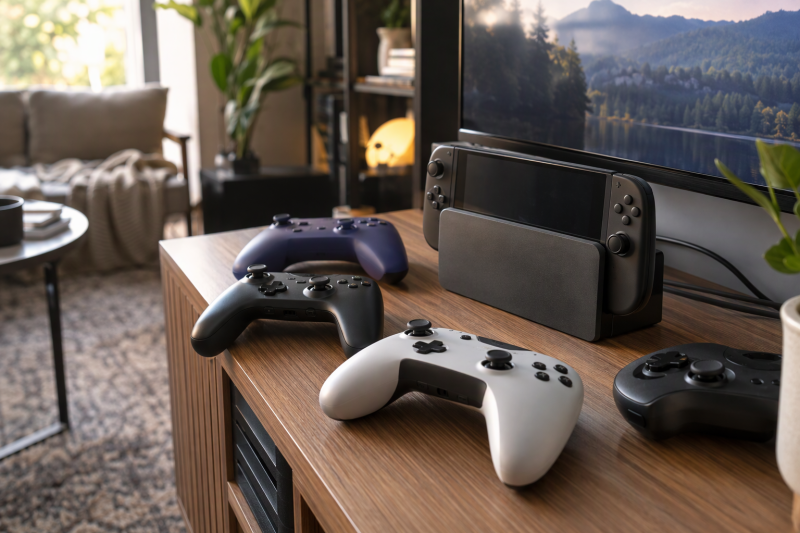
An external controller can make a handheld PC easier to use when it is connected to a TV or monitor, but the connection mode a maker lists for Windows is not always the one it lists for SteamOS. Microsoft and 8BitDo make the five controllers below. The group has two Xbox controllers, two full-size 8BitDo controllers with charging docks and one compact 8BitDo gamepad. Each section gives the modes the maker lists for Windows and for SteamOS, so you can match the controller to the handheld or Steam Deck you dock.
| Image | Product | Best fit | Connection by platform | Power | Included items | Watch-outs | Check Price |
|---|---|---|---|---|---|---|---|
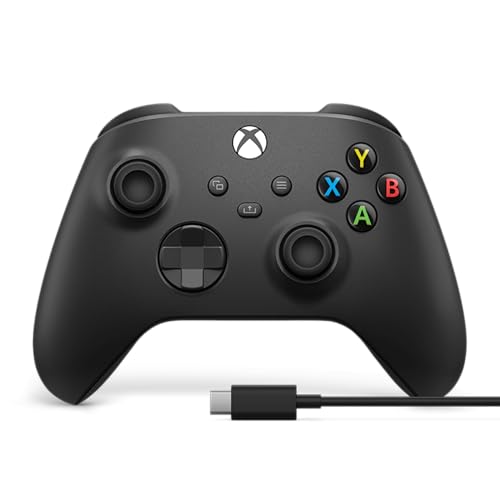 | Xbox Wireless Controller with USB-C Cable | Windows and included cable | Windows: Bluetooth or USB-C cable | Standard AA batteries | 9-foot USB-C cable | Steam Deck firmware may need update | Check Price on Amazon |
 | Xbox Elite Wireless Controller Series 2 Core | Adjustable sticks and triggers | Windows: Bluetooth, USB-C or Xbox Wireless adapter (sold separately) | Rechargeable; up to 40 hours | USB-C cable and adjustment tool | Extra component pack separate | Check Price on Amazon |
 | 8BitDo Ultimate 2 Wireless | Dock and extra buttons | 2.4 GHz or wired on Windows; Bluetooth on SteamOS | Charging dock | Dock, USB-C receiver and cable | SteamOS 3.7.13+; firmware v1.05 | Check Price on Amazon |
 | 8BitDo Pro 3 Bluetooth | Swappable button layout | 2.4 GHz or wired on Windows; Bluetooth or wired on SteamOS | Rechargeable; 1000 mAh; charging dock | Dock, adapter and button puller | SteamOS 3.7.13+; update firmware | Check Price on Amazon |
 | 8BitDo SN30 Pro Bluetooth | Compact retro-style play | Bluetooth or USB-C | Rechargeable; 18 play hours | USB-C cable | SteamOS 3.7.13+; firmware v2.06+ | Check Price on Amazon |
1. Xbox Wireless Controller with USB-C Cable — Best for Windows and a Long Cable
The Xbox Wireless Controller with USB-C Cable (model EP2-29943 on the Amazon listing) comes with a 9-foot USB-C cable. Microsoft’s page says Windows 10 and 11 PCs connect by Bluetooth or that cable, and Windows 7 and 8.1 PCs use the cable with some functions unsupported. The Amazon listing adds that plugging the cable into a Windows PC needs no adapter or Bluetooth pairing. The same listing names a hybrid D-pad, textured grip on the triggers, bumpers and back case, and a 3.5 mm headset jack.
Microsoft’s page says its battery testing used standard AA batteries, and the Amazon listing gives up to 40 hours of wireless play on them. For button remapping on Windows 10 or 11, Microsoft says the Xbox Accessories app requires a compatible USB-C cable. Valve’s Steam Deck guide says many Xbox controllers need a firmware update before they work as expected on the Deck, and it points to Xbox’s “Update on PC” instructions.
Limit: Valve says many Xbox controllers need a firmware update before they work as expected with Steam Deck.Our Take Choose this bundle for a conventional Xbox layout and the 9-foot cable Microsoft’s page lists in the box.
- If you want a long cable with a conventional Xbox layout, Microsoft’s page lists a 9-foot USB-C cable in this bundle.
- Microsoft’s page lists Bluetooth or the cable for Windows 10 and 11. You choose between wireless and wired play.
- The Amazon listing describes a hybrid D-pad and a 3.5 mm jack for plugging in a headset.
- Valve says many Xbox controllers need a firmware update before they work as expected with Steam Deck, and it points to Xbox’s “Update on PC” instructions.
- Going wireless means running on standard AA batteries, according to the Amazon listing.
2. Xbox Elite Wireless Controller Series 2 Core — Best for Adjustable Sticks and Triggers
The Elite Series 2 Core pairs adjustable-tension thumbsticks, shorter hair trigger locks and a wrap-around rubberized grip with an Xbox layout. Microsoft’s page gives three thumbstick tension settings that you set with the included adjustment tool. The same page gives an internal rechargeable battery rated for up to 40 hours per charge, and battery life varies with use. For Windows 10 and 11, Microsoft says the controller needs Bluetooth, the included USB cable or the Xbox Wireless adapter, which is sold separately.
The Amazon listing gives the Core box as the controller, a USB-C cable, one D-pad, two standard thumbsticks and the adjustment tool. It says additional components are sold separately in the Complete Component Pack. Microsoft’s comparison lists the paddles, charging dock and carrying case only for the full Elite Series 2, so do not assume the Core includes them. Microsoft says the Xbox Accessories app, which handles button mapping and profiles, runs on Xbox Series X|S, Xbox One and Windows 10 and 11. Valve notes that many Xbox controllers need a firmware update for Steam Deck.
Limit: Microsoft’s comparison does not list the paddles, charging dock or case with the Core, and Valve says many Xbox controllers need a firmware update for Steam Deck.Our Take Pick Elite Core for adjustable sticks and trigger locks when you accept that the extra components are sold apart.
- For tuning stick feel, Microsoft’s page lists adjustable-tension thumbsticks with three tension settings, plus shorter hair trigger locks.
- Microsoft’s comparison lists a USB-C cable and thumbstick-adjustment tool with the Core, and Microsoft’s page says the tool sets stick tension.
- Microsoft rates the internal rechargeable battery at up to 40 hours per charge, and battery life varies with use.
- The Amazon listing says additional components are sold separately, an extra purchase if you want them.
- Check your platform before relying on button mapping. Microsoft says Xbox Accessories app features are only available on Xbox Series X|S, Xbox One and Windows 10 and 11.
3. 8BitDo Ultimate 2 Wireless — Best for a Charging Dock and Back Buttons
The Ultimate 2 Wireless (model 81HE-SG on the Amazon listing) comes with a charging dock, a USB-C 2.4G adapter and a USB cable, according to 8BitDo. 8BitDo’s page describes TMR joysticks and a switch between linear Hall-effect and tactile triggers. The same page covers two pro back paddle buttons, remappable L4 and R4 fast bumpers, three custom profiles and an RGB fire ring. It gives 1,000 Hz polling over 2.4G and wired connections as ideal-environment lab data. Under 2.4G mode, the page gives 6-axis motion control.
8BitDo lists Windows 10 (1903) and above and SteamOS 3.7.13 or above, with 2.4G or wired use for Windows. Its Steam compatibility page puts the controller in Bluetooth mode and requires firmware v1.05 for SteamOS. For Windows, 8BitDo says to keep the adapter in the dock and connect the dock to the PC by USB to extend the wireless signal.
Limit: 8BitDo gives 1,000 Hz polling for 2.4G and wired use and motion control under 2.4G mode, while its Steam page uses Bluetooth with firmware v1.05.Our Take Choose Ultimate 2 Wireless for the dock, the extra buttons and a 2.4G connection on Windows.
- The box already holds a charging dock, 2.4G adapter and USB cable, according to 8BitDo’s page.
- For extra buttons, 8BitDo lists back paddles and L4 and R4 bumpers, alongside TMR joysticks and switchable triggers.
- You’ll find Bluetooth pairing steps and the v1.05 firmware requirement for SteamOS on 8BitDo’s Steam page.
- On Bluetooth, do not count on the headline polling rate, since 8BitDo gives its 1,000 Hz figure for 2.4G and wired connections only.
- Check the firmware before pairing on SteamOS, where 8BitDo’s Steam page requires Bluetooth mode and v1.05.
4. 8BitDo Pro 3 Bluetooth — Best for Swappable Button Layout
The Pro 3 Bluetooth has magnetic ABXY buttons that swap between Switch and Xbox layouts. 8BitDo includes the button puller, two ball-top joystick caps, a charging dock, a 2.4G adapter and a USB cable. 8BitDo’s page lists TMR joysticks and a switch between linear Hall-effect and non-linear micro-switch triggers. Also on the page are two pro back paddle buttons, L4 and R4 fast bumpers and a 1000 mAh battery. The Amazon listing names the same dock, swappable ABXY buttons and trigger switch.
8BitDo specifies 2.4G or wired USB for Windows 10 (1903) and above, and Bluetooth or wired USB for SteamOS 3.7.13 or above. Its Steam page asks for the latest firmware. The polling rates on 8BitDo’s page depend on the input mode, with 250 Hz over wired or 2.4G in X input and 60 to 100 Hz over Bluetooth in D input. 8BitDo lists 6-axis motion control for Switch and Steam only.
Limit: 8BitDo lists different connection modes for Windows and SteamOS, and motion control for Switch and Steam only.Our Take Pick Pro 3 for swappable ABXY buttons, back paddles and a dock, and use 2.4G on Windows and Bluetooth or a cable on SteamOS.
- 8BitDo’s page lists magnetic ABXY buttons that swap between Switch and Xbox layouts, and the button puller for the job is included.
- 8BitDo lists a charging dock in the box, along with a 2.4G adapter and USB cable for connecting.
- Players who want more inputs get two pro back paddle buttons and L4 and R4 fast bumpers on 8BitDo’s list.
- Your connection choices differ by system, because 8BitDo lists 2.4G or wired for Windows and Bluetooth or wired for SteamOS.
- Check your platform if motion control is on your list, because 8BitDo lists its 6-axis feature for Switch and Steam only.
5. 8BitDo SN30 Pro Bluetooth — Best Compact Retro-Style Controller
The SN30 Pro Bluetooth is the retro-style gamepad in this group. 8BitDo’s page gives 144 x 63.5 x 33 mm and 114 g, while the Amazon listing gives 144 x 63.5 x 32.5 mm. 8BitDo lists Hall-effect joysticks, rumble, a USB-C cable in the box, a 480 mAh rechargeable battery and 18 play hours per charge with a 1 to 2 hour charge. The Amazon listing gives the same battery size and play time. For comparison, 8BitDo’s page gives 242.4 g for the Pro 3.
8BitDo lists Windows 10 (1903) and above and SteamOS 3.7.13 or above, with Bluetooth 4.0 and USB-C connections. Its Steam page covers Bluetooth or wired use and requires firmware v2.06 or above. 8BitDo lists motion control for Switch only on this model, although the Amazon listing mentions 6-axis motion controls without naming a platform.
Limit: 8BitDo’s Steam page requires firmware v2.06 or above, and 8BitDo lists motion control for Switch only.Our Take Pick SN30 Pro for a light retro-style gamepad with Bluetooth and a USB-C cable, and check that it is on firmware v2.06 or above for SteamOS.
- 8BitDo lists Hall-effect joysticks and rumble, plus a USB-C cable in the box for wired use.
- Between charges, 8BitDo gives 18 play hours from the 480 mAh battery.
- 8BitDo’s Steam page lists Bluetooth or wired use, a wireless and a wired option for SteamOS owners.
- If you want motion control on a handheld PC, note that 8BitDo lists it for Switch only.
- 8BitDo’s Steam page requires firmware v2.06 or above, a version to confirm before you pair on SteamOS.
Buying Guide: Choosing a Controller for a Handheld PC
Match the connection to the operating system
8BitDo’s pages list 2.4G or wired for Windows on the Ultimate 2 Wireless and Pro 3. For SteamOS, 8BitDo lists Bluetooth or wired on the Pro 3, and its Steam page puts the Ultimate 2 in Bluetooth mode. For the SN30 Pro, 8BitDo’s page lists Bluetooth and USB-C connections.
Microsoft’s page lists Bluetooth or the included USB-C cable for Windows 10 and 11 on the Xbox Wireless Controller. For the Elite Series 2 Core, Microsoft says Windows 10 and 11 need Bluetooth, the included cable or the separately sold Xbox Wireless adapter. Valve’s Steam Deck guide covers Bluetooth pairing and says many Xbox controllers need a firmware update.
Check SteamOS and firmware requirements
8BitDo’s Steam compatibility page lists SteamOS 3.7.13 or above and Windows 10 or 11, and asks for Bluetooth or D-input mode. The page requires controller firmware v1.05 for the Ultimate 2 Wireless and v2.06 or above for the SN30 Pro, and it asks for the latest firmware on the Pro 3.
For an Xbox controller, Valve says to apply any available firmware update when pairing fails, and it points to the Update on PC instructions on Xbox’s support site. Plan to run that update from a Windows PC before you rely on a new Xbox controller away from home.
Compare controls and platform-specific features
8BitDo’s pages list swappable magnetic ABXY buttons, back paddles and L4 and R4 bumpers for the Pro 3, and back paddles, L4 and R4 bumpers and switchable triggers for the Ultimate 2 Wireless. Microsoft’s page lists adjustable stick tension and trigger locks for the Elite Series 2 Core, and its comparison does not list paddles with the Core.
8BitDo lists motion control for Switch only on the SN30 Pro, for Switch and Steam only on the Pro 3, and under 2.4G mode on the Ultimate 2. The Amazon listing for the SN30 Pro mentions 6-axis motion controls without naming a platform, so use 8BitDo’s platform list.
Plan power, cables and a dock
The Amazon listing and Microsoft’s page describe the Xbox Wireless Controller with a 9-foot USB-C cable and standard AA batteries for wireless play. Microsoft rates the Elite Core at up to 40 hours on its internal rechargeable battery.
8BitDo lists charging docks in the box with the Ultimate 2 Wireless and Pro 3, and a USB-C cable with the SN30 Pro. For wired play on a docked handheld, check that the dock’s USB port carries data and that the cable is not charge-only.
Look beyond the headline polling rate
8BitDo gives 1,000 Hz polling for the Ultimate 2 Wireless over 2.4G and wired connections, as ideal-environment lab data. For the Pro 3, 8BitDo’s page lists 250 Hz over wired or 2.4G in X input and 60 to 100 Hz over Bluetooth in D input. Each figure belongs to the controller and mode 8BitDo names.
8BitDo’s Steam page uses Bluetooth for the Ultimate 2 on SteamOS, and its Ultimate 2 page gives no Bluetooth polling figure. Choose by the mode the maker documents for your system, plus shape and controls. For other handheld gear, see microSD cards for handheld gaming PCs, and compare USB-C hubs for a desk connection.
Frequently Asked Questions
Can I use a controller with a docked Steam Deck?
8BitDo’s Steam page lists Bluetooth for the Ultimate 2 Wireless and Bluetooth or wired for the Pro 3 and SN30 Pro, on SteamOS 3.7.13 or above. It says its controllers work with other SteamOS handhelds. Neither 8BitDo’s page nor Valve’s Steam Deck guide says anything specific about docked play, so check the mode and firmware listed for each controller.
Valve’s guide also says many Xbox controllers need a firmware update before they work as expected with Steam Deck, and it points to Xbox’s “Update on PC” instructions.
Does the 2.4 GHz receiver work the same way on every system?
No. 8BitDo lists 2.4G for Windows on the Ultimate 2 Wireless and Pro 3. Its Steam page uses Bluetooth for the Ultimate 2 and Bluetooth or wired for the Pro 3 on SteamOS.
8BitDo’s Ultimate 2 page says to keep the adapter in the dock and connect the dock to a Windows PC by USB. Check the exact controller model and firmware instructions, because two 8BitDo controllers can list different modes.
Does the Xbox Elite Series 2 Core include paddles and a charging dock?
The Amazon listing gives the Core box as the controller, a USB-C cable, one D-pad, two standard thumbsticks and a thumbstick-adjustment tool, and says additional components are sold separately. Microsoft’s comparison lists the same cable and adjustment tool for the Core, and lists paddles, a charging dock and a carrying case only for the full Elite Series 2.
The Amazon listing names the Complete Component Pack as the way to add components. Check the box contents on the offer before ordering.
Do all these controllers use rechargeable batteries?
No. The Amazon listing for the Xbox Wireless Controller describes up to 40 hours on standard AA batteries and includes a USB-C cable. Microsoft rates the Elite Series 2 Core at up to 40 hours on an internal rechargeable battery.
8BitDo lists a 1000 mAh battery for the Pro 3 and a 480 mAh rechargeable battery for the SN30 Pro. The company describes the Ultimate 2 Wireless and Pro 3 docks as keeping the controller charged.
Does 1,000 Hz mean the same performance over Bluetooth?
Not necessarily. 8BitDo gives 1,000 Hz for 2.4G and wired connections on the Ultimate 2 Wireless, and its Steam page specifies Bluetooth for SteamOS. The Ultimate 2 page does not give a Bluetooth polling figure.
Responsiveness also depends on the host, connection and game, and 8BitDo describes its polling figures as ideal-environment lab data.