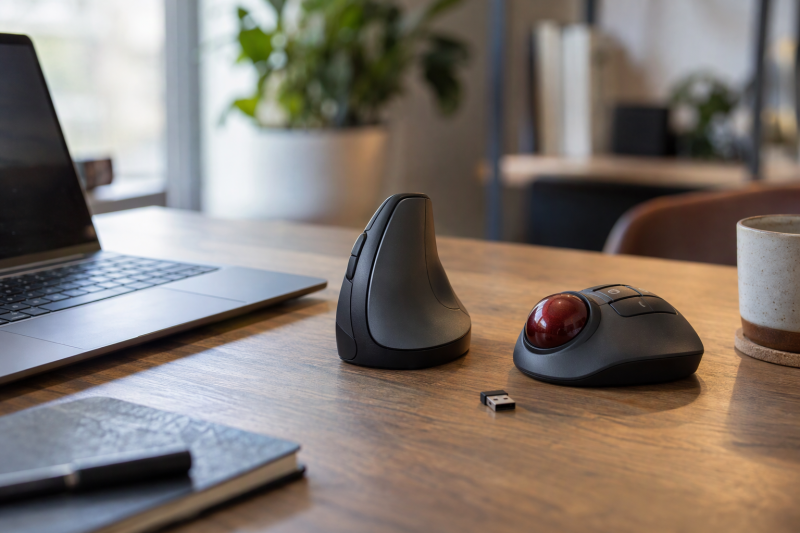
Ergonomic mice are not one shape. Five of the six picks below are vertical mice, and one is a thumb trackball that stays in place on the desk. Each maker or Amazon listing states its own hand size, connection, button, and battery details, and those details decide the match more than the word ergonomic does.
The set includes two receiver-only models, two rechargeable models, and the trackball. For a general laptop mouse decision outside ergonomic shapes, see the mice for laptops guide. A laptop with few USB ports can use the USB-C docking-station guide to plan a separate path for a receiver.
Pick the grip shape and the hand-size statement first. Then check that the laptop has Bluetooth or a free USB port for the receiver.Ergonomic Mice Compared
| Image | Product | Details | Check Price |
|---|---|---|---|
 | Logitech Lift | Best fit: Small to medium right hands that want a vertical mouse with an AA battery Design: Logitech lists a 57-degree vertical angle and thumb rest Connection: Bluetooth Low Energy or included Logi Bolt receiver Controls: Logitech lists six buttons and 400 to 4,000 DPI Power: One AA included; Logitech lists up to 24 months | Check Price on Amazon |
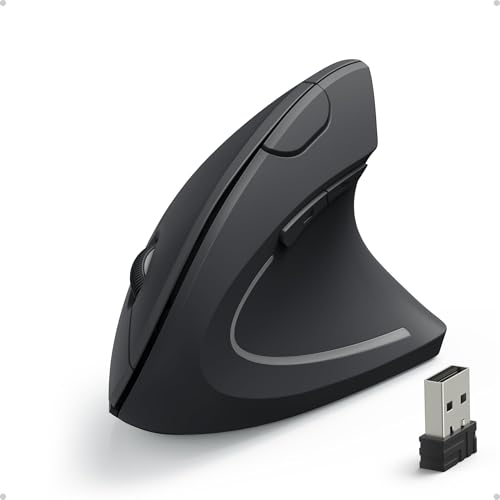 | Anker 2.4G Wireless Vertical Mouse | Best fit: Right-hand vertical mouse on a USB receiver Design: Amazon lists a vertical handshake shape Connection: 2.4 GHz USB receiver only, not Bluetooth Controls: Amazon lists five buttons and 800, 1,200, or 1,600 DPI Power: Two AAA batteries, not included | Check Price on Amazon |
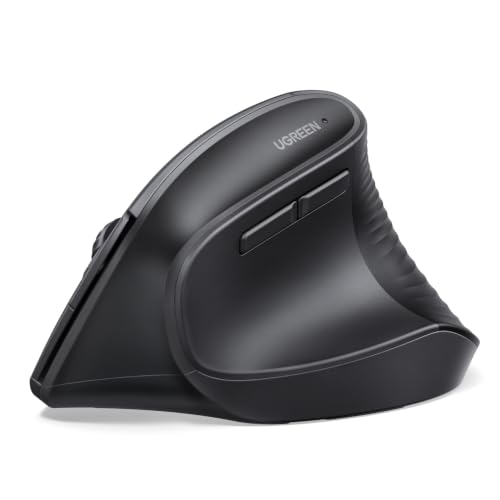 | UGREEN Ergonomic Wireless Mouse | Best fit: Medium to large hands that switch between devices Design: Vertical handshake shape, not for small hands per UGREEN Connection: Bluetooth or 2.4 GHz, up to three devices Controls: Five or six buttons (listing differs); 1,000 to 4,000 DPI Power: One AA battery with sleep mode | Check Price on Amazon |
 | ProtoArc EM11 NL | Best fit: Hands under 7.5 inches long that want a rechargeable mouse Design: ProtoArc lists a 58-degree vertical design Connection: Two Bluetooth connections or 2.4 GHz USB-A receiver Controls: ProtoArc lists 1,000, 1,600, or 2,400 DPI Power: 500 mAh battery; Type-C cable charges only | Check Price on Amazon |
 | Lekvey XC-05 | Best fit: Medium or larger hands that want a rechargeable receiver-only mouse Design: Vertical handshake shape, not for small hands per Lekvey Connection: 2.4 GHz USB-A receiver only, no Bluetooth Controls: Amazon title lists six buttons; 800, 1,200, or 1,600 DPI Power: 600 mAh rechargeable battery | Check Price on Amazon |
 | Logitech Ergo M575S | Best fit: Right-handed thumb trackball at a small desk Design: Logitech lists a sculpted trackball with thumb control Connection: Bluetooth Low Energy or included Logi Bolt receiver Controls: Logitech lists three customizable buttons and up to 2,000 DPI Power: One AA included; Logitech lists up to 18 months | Check Price on Amazon |
1. Logitech Lift — Best Vertical Mouse for Small to Medium Hands With an AA Battery
Logitech sells Lift for small to medium hands. It says the 57-degree angle puts the hand in what it calls a natural handshake position. Logitech lists a soft rubber grip with a thumb rest, a 125 g body, six buttons, and a sensor adjustable from 400 to 4,000 DPI. Logitech describes the clicks as whisper-quiet.
Lift connects through Bluetooth Low Energy or the Logi Bolt receiver in the box, and Logitech says the Bolt receiver needs an available USB port. Logitech’s FAQ says Easy-Switch pairs up to three devices. One AA battery comes in the box, and Logitech lists up to 24 months of life that varies with use.
Button customization is where the sources split. The Amazon title says four of the six buttons are customizable, while Logitech’s FAQ says all six are, through Logi Options+. Amazon describes this listing for small to medium right hands, and Logitech’s FAQ says a dedicated left-handed Lift is available.
Logitech lists Lift at a 57-degree angle, 400 to 4,000 DPI, and up to 24 months on one AA battery.Our Take Choose Lift for a small to medium right hand when you want a battery you can swap. Skip this version for a left hand, a hand larger than the small to medium size Logitech names, or a desk where a stationary trackball fits better.
- Logitech sells Lift for small to medium hands and lists a 57-degree angle for the handshake position.
- Logitech lists Bluetooth Low Energy or an included Logi Bolt receiver, and its FAQ says Easy-Switch pairs up to three devices.
- Logitech lists a sensor from 400 to 4,000 DPI and one included AA battery, with up to 24 months of life.
- The Amazon title says four of the six buttons are customizable, but Logitech’s FAQ says all six are.
- Logitech says the Logi Bolt receiver needs an available USB port, and Bluetooth Low Energy is the other connection it lists.
- Amazon describes this Lift for right hands, and Logitech’s FAQ says a dedicated left-handed Lift is available.
2. Anker 2.4G Wireless Vertical Mouse — Best Receiver-Only Vertical Mouse With Replaceable Batteries
Anker’s vertical mouse has one wireless path. The Amazon listing says it uses 2.4 GHz wireless through a USB receiver that stores in the bottom of the mouse. The listing also says the mouse is not Bluetooth, even though its title mentions multi-device connectivity. Amazon lists a right-hand vertical shape, five buttons, 800, 1,200, or 1,600 DPI, and next and previous buttons for browsing. Every figure in this paragraph comes from the Amazon listing.
Amazon says the mouse takes two AAA batteries that are not included. It also says the mouse goes into power-saving mode after 8 minutes of inactivity and that a press of the left or right button wakes it. The listing says key click sounds are unavoidable.
Our Take Choose the Anker for a right hand and a computer with a free port that fits its USB receiver, as long as buying two AAA batteries is acceptable. Skip it when Bluetooth is required or when a USB-C-only laptop has no adapter.
- Amazon says the Anker uses 2.4 GHz wireless through one USB receiver and is not a Bluetooth mouse.
- Amazon lists three DPI steps at 800, 1,200, and 1,600, plus next and previous buttons for browsing.
- Amazon says the Anker’s receiver stores in the bottom of the mouse.
- Amazon says the Anker takes two AAA batteries and does not include them.
- Amazon says the Anker’s key click sounds are unavoidable.
- Amazon lists a USB receiver as the only connection, so the computer needs a port that fits it.
3. UGREEN Ergonomic Wireless Mouse — Best Three-Device Vertical Mouse for Larger Hands
UGREEN’s Amazon listing says the vertical handshake shape is designed for medium to large hands and is not suitable for small hands. The listing points buyers to a hand-size guide in the product images. It gives Bluetooth or 2.4 GHz wireless with a range of up to 10 m, switching among up to three devices, and support for Windows, macOS, Linux, ChromeOS, and Android.
The listing names four DPI steps up to 4,000, quiet-click buttons, PTFE glide feet, one AA battery, and a smart sleep mode. It states the button count two ways. The title says six buttons, and a feature bullet says a five-button layout. UGREEN’s own page for this mouse was not located, so these figures come from the Amazon listing.
UGREEN’s Amazon listing states medium to large hands, switching among up to three devices, and DPI steps up to 4,000.Our Take Choose UGREEN for a medium to large hand that switches among up to three devices. Pass when the hand is small, because UGREEN says the shape is not suitable for small hands.
- UGREEN’s listing states Bluetooth or 2.4 GHz wireless, with switching among up to three devices.
- UGREEN’s listing gives four DPI steps, at 1,000, 1,600, 2,000, and 4,000.
- UGREEN’s listing names quiet-click buttons, PTFE glide feet, and a smart sleep mode.
- UGREEN says the mouse is not suitable for small hands.
- UGREEN’s title says six buttons, while its feature text says a five-button layout.
- UGREEN lists one AA battery and does not list a built-in rechargeable battery.
4. ProtoArc EM11 NL — Best Rechargeable Vertical Mouse for Small to Medium Hands
ProtoArc’s Amazon listing says the EM11 NL is designed for hand lengths under 7.5 inches and has a 58-degree vertical design. It lists two Bluetooth connections plus a 2.4 GHz USB-A receiver, for up to three devices at once, and DPI steps of 1,000, 1,600, and 2,400. The listing also says none of the buttons are programmable.
ProtoArc lists a built-in 500 mAh battery that charges through the included Type-C cable. ProtoArc says that cable is for charging only and that no USB-C receiver is included. Its quiet-click claim covers the left and right buttons only. The listing says the scroll wheel and the back and forward buttons are not silent, and that the back and forward buttons are not compatible with Mac OS. ProtoArc recommends one to two weeks to get used to the shape.
Our Take Choose the EM11 NL for a hand under 7.5 inches long that wants a rechargeable vertical mouse and three-device switching. Skip it for a Mac that needs the back and forward buttons or a setup that needs a USB-C receiver.
- ProtoArc’s listing states a 58-degree vertical design for hand lengths under 7.5 inches.
- ProtoArc lists two Bluetooth connections and a USB-A receiver, for up to three devices.
- ProtoArc lists a built-in 500 mAh battery that charges through the included Type-C cable.
- ProtoArc says the Type-C cable is for charging only and that no USB-C receiver is included.
- ProtoArc says the back and forward buttons are not compatible with Mac OS.
- ProtoArc recommends one to two weeks to get used to the vertical shape.
5. Lekvey XC-05 — Best Rechargeable Receiver-Only Vertical Mouse
Lekvey’s Amazon listing is the only one here that pairs a built-in battery with receiver-only wireless. It lists a 600 mAh battery and says one full charge lasts about three to four weeks at 8 to 10 hours of daily use, or up to two to three months with light use. The 2.4 GHz nano receiver stores in the bottom of the mouse, and Lekvey says no Bluetooth pairing or drivers are needed.
The Amazon title lists six buttons. The listing names page back and page forward buttons, DPI steps of 800, 1,200, and 1,600, and low-noise left and right buttons. Lekvey says the mouse is larger than traditional mice and not suitable for small hands. It also says a MacBook with only USB-C ports needs a USB-C-to-USB-A adapter, which is not included.
Our Take Choose the XC-05 for a medium or larger hand and a computer with a USB-A port when you would rather charge a battery than replace one. Pass when the hand is small or Bluetooth is required.
- Lekvey lists a built-in 600 mAh battery and says a full charge lasts about three to four weeks at 8 to 10 hours of daily use.
- Lekvey says the receiver stores in the bottom of the mouse and that no Bluetooth pairing or drivers are needed.
- Lekvey lists 800, 1,200, and 1,600 DPI, page back and forward buttons, and low-noise left and right buttons.
- Lekvey says the mouse is larger than traditional mice and not suitable for small hands.
- Lekvey says a MacBook with only USB-C ports needs a USB-C-to-USB-A adapter, which is not included.
6. Logitech Ergo M575S — Best Thumb Trackball for a Small Desk
The Ergo M575S is a thumb trackball. Logitech says thumb control moves the cursor without moving the arm, calls the design ideal for small or busy setups, and says it works on any surface. Logitech lists a 145 g body, up to 2,000 DPI, and five buttons, three of them customizable through Logi Options+ on Windows and macOS. It says the clicks are 80 percent quieter than on the original Ergo M575.
Logitech lists Bluetooth Low Energy or the Logi Bolt receiver in the box for the M575S and says the receiver needs a USB-A port. One AA battery is included, and Logitech lists up to 18 months of life. Logitech’s FAQ says the M575S is exclusively designed for right-handed users, while its product page calls the shape a good fit for most hand sizes. Logitech lists a 1-year limited hardware warranty.
Logitech lists the Ergo M575S at 145 g, up to 2,000 DPI, and up to 18 months on one AA battery.Our Take Choose the Ergo M575S for a right hand at a compact desk where thumb control saves arm movement. Skip it for a left hand or for anyone who wants the vertical handshake grip of the other five.
- Logitech says thumb control moves the cursor without moving the arm and that the trackball works on any surface.
- Logitech lists Bluetooth Low Energy or an included Logi Bolt receiver, and one included AA battery.
- Logitech lists three customizable buttons and says the clicks are 80 percent quieter than on the original Ergo M575.
- Logitech’s FAQ says the Ergo M575S is exclusively designed for right-handed users.
- Logitech lists the Ergo M575S at up to 2,000 DPI, below the 4,000 DPI that Logitech lists for Lift and that UGREEN lists.
Buying Guide
Choose a vertical grip or a thumb trackball first
A vertical mouse changes the angle of the hand, and a trackball changes what moves. Lift, Anker, UGREEN, EM11 NL, and XC-05 are vertical mice that travel across the desk. Logitech lists a 57-degree angle for Lift and ProtoArc lists 58 degrees, while the Anker, UGREEN, and Lekvey listings give no angle figure.
A trackball keeps the hand in place. Logitech says the Ergo M575S moves the cursor with the thumb and works on any surface. Decide on the pointing method before comparing DPI or battery type.
Treat hand-fit language as a product limit
Each hand-size statement belongs to one model. Logitech says Lift fits small to medium hands, ProtoArc says the EM11 NL is designed for hand lengths under 7.5 inches, and UGREEN says the UGREEN is for medium to large hands. Lekvey says the XC-05 is not suitable for small hands, and the Amazon listing for the Anker states no hand size.
Handedness is a separate limit. Amazon describes Lift and the Anker for right hands, and Logitech’s FAQ says the Ergo M575S is exclusively for right-handed users. A left-handed buyer should look at the dedicated left-handed Lift that Logitech lists.
Decide between Bluetooth and a receiver
Bluetooth saves a port, and a receiver needs one. Logitech lists Bluetooth Low Energy or an included Logi Bolt receiver for Lift and the Ergo M575S, and says the Bolt receiver needs a USB port. ProtoArc lists two Bluetooth connections plus a USB-A receiver for the EM11 NL, and UGREEN lists Bluetooth or 2.4 GHz for the UGREEN.
Two picks are receiver-only. Amazon says the Anker uses a USB receiver and is not Bluetooth, and Lekvey says the XC-05 connects through a USB-A receiver with no Bluetooth pairing. Check the laptop’s ports before choosing a receiver-only mouse, because Lekvey says a MacBook with only USB-C ports needs an adapter.
Read rechargeable and replaceable power as different systems
Two picks recharge, and the other four take batteries. ProtoArc lists a 500 mAh battery for the EM11 NL, and Lekvey lists a 600 mAh battery for the XC-05.
A battery-life figure belongs to its battery type. Logitech lists up to 24 months for Lift and up to 18 months for the Ergo M575S, each on one AA battery, and UGREEN lists one AA battery for the UGREEN without a life figure. Amazon says the two AAA batteries for the Anker are not included. Compare a maker’s battery claim only with the same battery type.
Compare controls and platform limits
DPI settings differ by model. Logitech lists 400 to 4,000 DPI for Lift and up to 2,000 DPI for the Ergo M575S, UGREEN lists up to 4,000 DPI, and ProtoArc lists up to 2,400 DPI. Anker and Lekvey each list 800, 1,200, and 1,600 DPI, so the top listed setting runs from 1,600 to 4,000 DPI across the set.
Button counts and software need a second look. Logitech lists six buttons for Lift and five for the Ergo M575S with three customizable. The UGREEN title and feature text disagree between six and five, and ProtoArc says none of its buttons are programmable. ProtoArc also says its back and forward buttons are not compatible with Mac OS. Read the button notes for the operating system you will use.
Give a vertical mouse time to become familiar
A new angle can feel different before it feels familiar. ProtoArc recommends one to two weeks to get used to the EM11 NL, and it is the only listing here that names an adjustment period.
A vertical mouse needs room to travel, and a trackball does not. Logitech says the Ergo M575S works on any surface and moves the cursor without moving the arm, while the vertical mice move across the desk. Measure the free desk width before choosing a vertical mouse.
FAQ
Is a vertical mouse always better than a normal mouse?
No. A vertical mouse changes the hand angle, and each listing here limits who it fits. Logitech says Lift is for small to medium hands, and UGREEN and Lekvey say theirs are not for small hands.
A trackball is the other path in this set. Logitech says the Ergo M575S moves the cursor with the thumb instead of the arm. Choose from hand size, handedness, and connection.
Which pick works with several devices?
Lift, UGREEN, and ProtoArc list multi-device use. Logitech’s FAQ says Lift pairs up to three devices through Easy-Switch, and UGREEN and ProtoArc each list up to three devices for the UGREEN and the EM11 NL.
The receiver-only picks suit one computer. The Anker title mentions multi-device connectivity, but its feature text describes one USB receiver, and Lekvey describes one USB-A receiver for the XC-05.
Can a USB-C charging cable act as a mouse receiver?
Not for the ProtoArc EM11 NL. Its Amazon listing says the Type-C cable is for charging only and that no USB-C receiver is included.
Charging and wireless input are separate functions. The XC-05 also charges its battery, but Lekvey says it connects through a USB-A receiver.
Which mouse is best for a small desk?
The Ergo M575S is the direct small-space option in this comparison. Logitech calls its thumb-control design ideal for small or busy setups and says it works on any surface.
Small hand size is not small desk space. Logitech lists Lift and ProtoArc lists the EM11 NL for small to medium hands, but both are vertical mice that travel across the desk. Pick the Ergo M575S when the desk is the constraint and the hand is a right one.
Do all the quiet-click models silence every control?
No. ProtoArc says the left and right buttons are quiet but the scroll wheel and the back and forward buttons are not. Amazon says key click sounds on the Anker are unavoidable.
Each maker words quiet clicking differently. Logitech describes whisper-quiet clicks for Lift and clicks 80 percent quieter than the original Ergo M575 for the Ergo M575S. UGREEN lists quiet-click buttons for the UGREEN, and Lekvey lists low-noise left and right buttons for the XC-05.
Bottom Line
Lift fits a small to medium right hand that wants an AA battery. Choose the UGREEN for a medium to large hand that switches between three devices, or the EM11 NL for a rechargeable vertical mouse under a 7.5-inch hand length. The XC-05 is the rechargeable receiver-only mouse, and the Anker is the receiver-only mouse on AAA batteries. For a right-handed thumb trackball, choose the Ergo M575S.