The Short Version
A 10GbE switch links a workstation, NAS, and other high-bandwidth devices on one local network. Port count is only one part of the choice. Decide whether every device needs 10G RJ45, whether SFP+ uplinks suit the existing cabling, whether Layer 2 controls are needed, and whether the network belongs on a desk or in a rack.
Choose the TP-Link TL-SX105 for five fanless 10G/multi-gig RJ45 devices. Choose the TRENDnet TEG-S7102 for eight RJ45 10G ports plus two SFP+ slots. The QNAP QSW-M2106-4S-US is the managed option for four SFP+ links and six 2.5G RJ45 devices.
Every switch here has 10GbE ports or uplinks that its listing supports. The network still needs compatible NICs, cable types, and storage hardware. Before you fill every port, decide which devices actually benefit from 10G.
Quick Picks
- Best quiet five-port switch: TP-Link TL-SX105 for fanless 10G/multi-gig desktop use.
- Best eight-port RJ45 switch: TP-Link TL-SX1008 for eight 10G/multi-gig ports and 160 Gbps listed capacity.
- Best managed mixed-port switch: QNAP QSW-M2106-4S-US for Layer 2 controls and SFP+ links.
- Best SFP+ uplink mix: QNAP QSW-308-1C for three SFP+, one combo port, and eight Gigabit ports.
How We Picked
These listings identify a 10GbE port or uplink in a desktop or rackmount switch. The comparison uses port medium, port count, listed switching capacity, managed versus unmanaged operation, mounting, and cooling. A USB Ethernet adapter is not a replacement for a switch that connects several devices.
A switch is one part of a fast network. A 10GbE adapter upgrades one computer, while a NAS enclosure provides storage. Confirm each workstation, NAS, cable, and switch port supports the link type you select.
10GbE Switches Compared
| Image | Product | Details | Check Price |
|---|---|---|---|
 | TP-Link TL-SX105 | Best fit: Quiet five-device 10G desktop Ports: Five 10G/multi-gig RJ45 Capacity: 100 Gbps listed Management: Unmanaged Cooling: Fanless | Check Price on Amazon |
 | TP-Link TL-SX1008 | Best fit: Eight RJ45 10G devices Ports: Eight 10G/multi-gig RJ45 Capacity: 160 Gbps listed Management: Unmanaged Mounting: Desktop or rackmount | Check Price on Amazon |
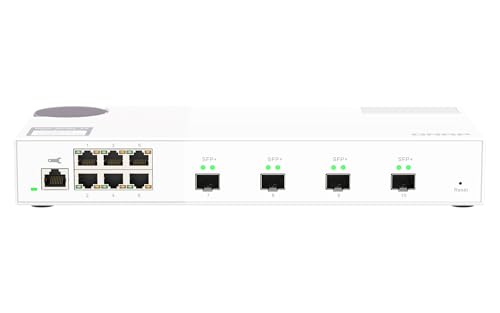 | QNAP QSW-M2106-4S-US | Best fit: Managed SFP+ and 2.5G mix Ports: Four 10G SFP+, six 2.5G RJ45 Management: Layer 2 Features: LACP, VLAN, ACL, LLDP Interface: Web GUI | Check Price on Amazon |
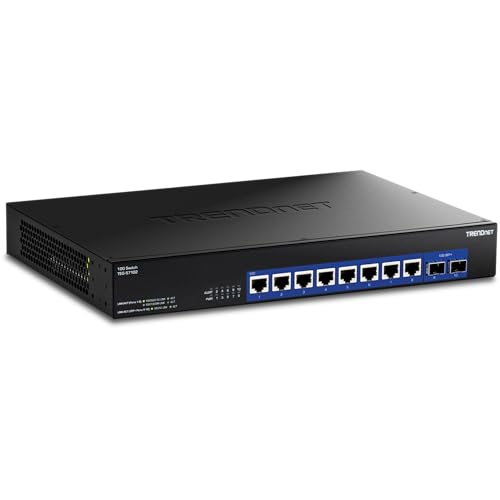 | TRENDnet TEG-S7102 | Best fit: Eight RJ45 plus two SFP+ links Ports: Eight 10G RJ45, two 10G SFP+ Capacity: 200 Gbps listed Management: Unmanaged Mounting: Rackmount | Check Price on Amazon |
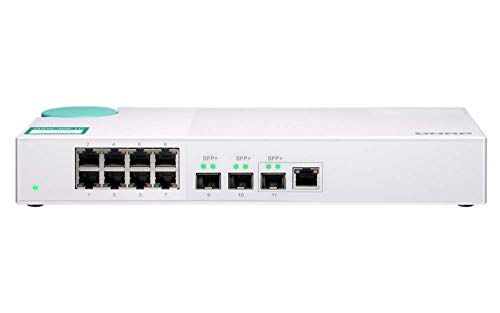 | QNAP QSW-308-1C | Best fit: SFP+ uplinks with Gigabit devices Ports: Three 10G SFP+, one combo, eight Gigabit Management: Unmanaged Case: Plastic Operation: Silent listed | Check Price on Amazon |
1. TP-Link TL-SX105 — Best for a Quiet Five-Device 10G Desktop
The TL-SX105 is the compact choice for a workstation, NAS, and a few fast local devices using copper Ethernet. TP-Link lists five 10G/multi-gig RJ45 ports, 100 Gbps switching capacity, auto-negotiation from 100 Mb through 10G, fanless cooling, and plug-and-play operation.
Pros
- Five 10G/multi-gig RJ45 ports directly suit a small all-copper post-production desktop network.
- Fanless operation is listed for buyers keeping the switch near an editing workstation.
- The stated switching capacity of 100 Gbps is the figure to compare with the larger models’ stated capacities.
Cons
- Five ports can fill quickly when a NAS, workstation, router, and several editing systems share one switch.
- It does not provide SFP+ ports for fiber or direct-attach-cable uplinks.
2. TP-Link TL-SX1008 — Best for Eight RJ45 10G Devices
The TL-SX1008 is the step up from the five-port TL-SX105 when more workstations and storage devices connected by copper need full-speed switch ports. It lists eight 10G/multi-gig RJ45 ports, 160 Gbps switching capacity, auto-negotiation, plug-and-play operation, and desktop or rackmount placement.
Pros
- Eight 10G/multi-gig RJ45 ports support a larger all-copper workstation and NAS network.
- The listed capacity of 160 Gbps is higher than the five-port TP-Link model’s.
- Desktop and rackmount support gives buyers two stated placement options for a studio network.
Cons
- Smart fan cooling is less inherently quiet than the TL-SX105’s listed fanless design.
- It is unmanaged, so it lacks the QNAP model’s Layer 2 segmentation controls.
3. QNAP QSW-M2106-4S-US — Best for Managed SFP+ and 2.5G Mix
This QNAP switch is the managed choice for a network mixing SFP+ storage or workstation links with 2.5G access devices. QNAP lists four 10G SFP+ ports and six 2.5G RJ45 ports, with Layer 2 management through its QSS web interface. LACP, VLAN, ACL, and LLDP are named features.
Pros
- Four 10G SFP+ ports directly support fiber or direct-attach-cable plans where appropriate.
- Layer 2 controls including VLAN and LACP are listed for buyers needing managed segmentation.
- Six 2.5G RJ45 ports let slower multi-gig devices share the same switch.
Cons
- Its RJ45 ports are 2.5G, not eight or five full 10G copper ports.
- Managed controls add setup decisions compared with plug-and-play unmanaged switches.
4. TRENDnet TEG-S7102 — Best for Eight RJ45 and Two SFP+ Links
The TEG-S7102 suits a post-production network that needs multiple copper devices plus two SFP+ uplinks without Layer 2 management. TRENDnet lists eight 10G RJ45 ports, two 10G SFP+ slots, 200 Gbps switching capacity, and rackmount design.
Pros
- Eight 10G RJ45 ports plus two 10G SFP+ slots provide the broadest listed 10G port mix.
- 200 Gbps switching capacity is the highest stated capacity in this group.
- SFP+ slots let the buyer reserve fast uplinks without sacrificing copper workstation ports.
Cons
- Rackmount design may be less convenient than a small fanless desktop switch at a quiet editing desk.
- Unmanaged operation does not supply VLAN or LACP controls for segmented networks.
5. QNAP QSW-308-1C — Best for SFP+ Uplinks and Gigabit Devices
This QNAP switch is the mixed-speed choice when only a few workstations or a NAS need 10G while printers and ordinary network devices run at Gigabit. QNAP lists three 10G SFP+ ports, one 10G SFP+/RJ45 combo port, and eight Gigabit RJ45 ports in a compact silent desktop switch.
Pros
- Three SFP+ ports and one combo port provide four potential high-speed link positions.
- Eight Gigabit RJ45 ports let ordinary peripherals connect without using the limited 10G connections.
- Silent desktop operation is listed for a switch that may sit near an editing area.
Cons
- Its eight RJ45 access ports are Gigabit, not full 10G copper ports.
- Plastic case and unmanaged operation may not fit every studio’s physical or network-control needs.
Buying Guide: Choosing a 10GbE Switch
Choose copper RJ45 or SFP+ before counting ports
TL-SX105 and TL-SX1008 have 10G/multi-gig RJ45 on every port. TRENDnet mixes eight 10G RJ45 ports with two SFP+ slots. QNAP M2106-4S instead uses four 10G SFP+ and six 2.5G RJ45 ports, while QSW-308-1C reserves its 10G capability for SFP+ and combo links.
The port medium must match the NICs and cable plan. RJ45 can use suitable copper cabling, while SFP+ can suit fiber or direct-attach cables. A switch with many ports is not useful if the workstation or NAS cannot connect to the port type you choose.
Count devices that truly need 10G bandwidth
A workstation editing directly from a NAS may need 10G, while a printer or control computer may not. TL-SX105 offers five full 10G copper ports, and TL-SX1008 offers eight. TRENDnet offers eight RJ45 plus two SFP+. QSW-308-1C mixes a few 10G uplinks with eight Gigabit ports.
Use the 10G device count instead of buying only by headline port total. Reserve room for the NAS, main workstation, and network uplink, then decide whether additional high-speed ports are required now or whether Gigabit and 2.5G access ports are enough.
Decide whether managed Layer 2 controls are necessary
QNAP M2106-4S lists Layer 2 management, web GUI access, LACP, VLAN, ACL, and LLDP. The TP-Link, TRENDnet, and QNAP QSW-308-1C models are unmanaged according to their listings. Management is useful only when the network plan actually calls for those controls.
For a simple single-subnet editing network, plug-and-play operation can be easier to maintain. For separate storage, guest, or production segments, a managed switch may be the right fit. Plan the desired topology before making web controls a deciding feature.
Check switching capacity and cooling against placement
The listed capacities are 100 Gbps for TL-SX105, 160 Gbps for TL-SX1008, and 200 Gbps for TRENDnet. TL-SX105 is fanless. TL-SX1008 lists a smart fan. QSW-308-1C lists silent operation. These details help compare both scale and practical placement near an edit desk.
Use cooling and capacity as separate checks. A higher port count can require different cooling, while a fanless model may be preferable in a quiet room if its five ports are enough. Confirm rack, shelf, or desktop space before choosing the largest switch.
Keep the whole network on the same plan
A 10G switch alone does not make every transfer run at 10G. The workstation needs a matching network interface, the NAS needs suitable ports and storage performance, and the cable type must support the selected link. The switch connects the devices, but it is not the only part that sets performance.
List the workstation, NAS, NIC, and cable for every planned high-speed link. With that list, you avoid spending on eight 10G RJ45 ports when the network has only two 10G endpoints and several ordinary Gigabit peripherals.
Frequently Asked Questions
Do all devices need 10GbE to use a 10GbE switch?
No. TL-SX105 and TL-SX1008 list auto-negotiation across 100 Mb, 1G, 2.5G, 5G, and 10G. QSW-308-1C explicitly mixes 10G SFP+ links with eight Gigabit ports, and QNAP M2106-4S combines 10G SFP+ with 2.5G RJ45.
Decide which endpoints need 10G. Keep high-bandwidth storage and editing systems on fast ports, then use lower-speed ports for devices that do not need the same local throughput.
Is an unmanaged 10GbE switch enough for editing?
Often, yes. TP-Link, TRENDnet, and QNAP QSW-308-1C are unmanaged choices in this group. They suit a straightforward local network where all devices share one simple network and the buyer does not need VLAN, LACP, ACL, or LLDP controls.
Choose managed switching only when network segmentation or aggregation is part of the actual plan. QNAP M2106-4S lists these Layer 2 features, but more controls also mean more setup and a topology to manage.
Should I choose SFP+ or 10G RJ45?
Choose the port medium that matches the equipment. TP-Link models offer 10G/multi-gig ports that are all RJ45, TRENDnet mixes RJ45 and SFP+, and QNAP offers options built around SFP+. The right answer depends on NICs, cable runs, and the NAS or workstation ports already owned.
Check the existing network interfaces before ordering. A switch cannot turn an RJ45-only computer into an SFP+ device or make a 2.5G port operate at 10G without the required compatible hardware.
How many 10G ports should a small studio have?
Count the NAS, main workstation, and any other systems that transfer large media locally. TL-SX105 has five full 10G RJ45 ports, TL-SX1008 has eight, and TRENDnet provides eight RJ45 plus two SFP+ positions.
Leave a growth port when possible. A simple two-endpoint network may not need an eight-port switch today, but storage expansion, another edit station, or a fast uplink can change the count quickly.
Does switching capacity matter for a desktop switch?
It is a useful stated comparison figure. TL-SX105 lists 100 Gbps, TL-SX1008 lists 160 Gbps, and TRENDnet lists 200 Gbps. The figures rise with the models’ different counts of 10G ports and help tell the models apart.
Consider capacity together with port type and topology. A high listed number does not replace compatible NICs, storage, cable runs, or the right number of endpoints. Match the switch to the complete local network rather than one specification.
Bottom Line
Choose the TP-Link TL-SX105 for a fanless five-port copper 10G desktop, the TRENDnet TEG-S7102 for eight 10G RJ45 and two SFP+ links in a rack, or the QNAP QSW-M2106-4S-US for managed SFP+ and 2.5G segmentation.