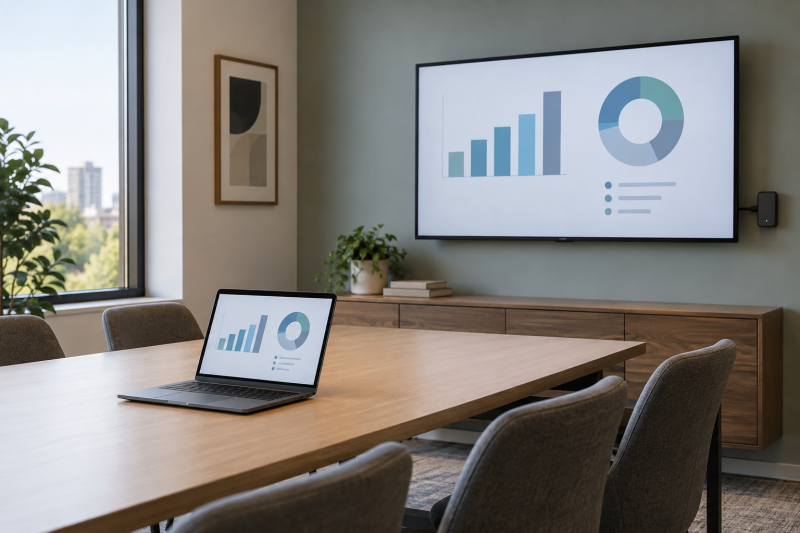
A wireless presentation system lets a laptop share to the room display through a dedicated transmitter and receiver instead of relying on a conference-room cable. The useful differences are the input the transmitter expects, the stated display output, how many presenters the system supports, and whether the room needs touchback, annotation, or a more involved video-conference setup.
The five systems here are built around distinct meeting-room jobs. ClearClick’s USB-C transmitters need a video-capable USB-C port, while BenQ includes USB-C and HDMI button cables. Monoprice and SIIG list up to 16 connections, MeetHub lists quad view and dual HDMI output, and BenQ lists touchback control. Match that room workflow before comparing a generic wireless video number.
The transmitter’s host-port requirement matters as much as the receiver’s HDMI connection to the room display.Wireless Presentation Systems Compared



1. Monoprice One-Click USB-C Wireless Presenter — Best 16 Listed Connections
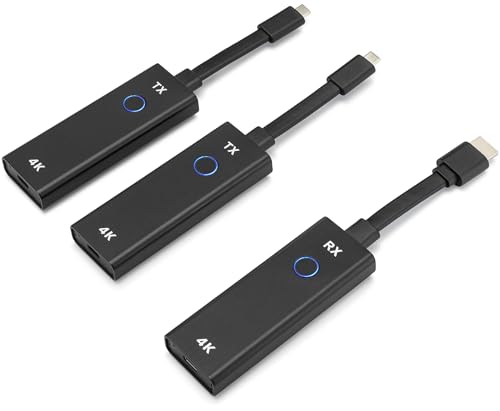
Monoprice lists a wireless conference presentation system with 4K output at 60 Hz, two transmitters, support for Windows, Mac, iOS, Android, and Miracast, and up to 16 simultaneous connections when additional compatible transmitters are used. It is the clearest fit for a room where different people regularly bring their own devices and the main need is straightforward screen sharing rather than a built-in collaboration surface.
The listing says two users can share on screen simultaneously, so it gives the meeting a stated side-by-side sharing option without moving to MeetHub’s quad-view layout. Its two included transmitters make it more usable out of the box than a receiver-only setup, but the 16-connection figure requires extra 45044 transmitters. Treat the listed starter kit and expanded connection count as two different configurations.
Our TakeBuy Monoprice when you want two included transmitters, 4K at 60 Hz, and up to 16 listed connections with extras. It is a strong general meeting-room system when device variety counts for more than touchback control or dual HDMI outputs.
- Two transmitters are included, so a room can begin with two dedicated sharing devices without an extra purchase.
- The listing supports Windows, Mac, iOS, Android, and Miracast for mixed-device meeting rooms.
- Up to 4K at 60 Hz is the highest stated refresh specification in this five-product group.
- Two users can share on screen simultaneously, giving the room a listed dual-presenter arrangement.
- Up to 16 simultaneous connections are listed when compatible additional transmitters are added.
- The 16-connection figure requires additional 45044 transmitters beyond the two included units.
- The listing does not describe touchback control, annotation, or a dual-HDMI display arrangement.
2. ClearClick Present+Share 4K USB-C — Best 160-Foot Listed Range
ClearClick includes two 4K USB-C transmitters and one 4K HDMI receiver, with a listed 160-foot wireless range and video up to 4K at 30 fps. The kit’s defining detail is its host requirement. The laptop, netbook, or smartphone needs a USB-C port that supports DisplayPort video output and is from 2018 or later according to the listing.
The system uses encrypted 5 GHz Wi-Fi according to its product details and is described as plug and play through a transmit button. It also says it is backward compatible with 1080p and includes a three-year warranty and US-based technical support. Choose it when the presenter’s USB-C ports are known to carry video. Do not assume every USB-C charging port can satisfy that stated requirement.
Our TakeBuy ClearClick when you need two USB-C transmitters, an HDMI receiver, and a stated 160-foot range. Its limitation is clear and practical, since the host device must provide USB-C DisplayPort video output.
- Two 4K USB-C transmitters and one 4K HDMI receiver are included in the listed presentation kit.
- A stated 160-foot wireless range gives a concrete placement figure for a larger conference or classroom room.
- The system lists up to 4K at 30 fps and backward compatibility with 1080p displays.
- A transmit button is listed for plug-and-play sharing from the supported USB-C host devices.
- The source device needs a USB-C port with DisplayPort video output, which not every USB-C port provides.
- Its listed 4K output is 30 fps rather than Monoprice’s stated 4K at 60 Hz.
- The product description does not list a quad-view or dual-HDMI presentation layout.
3. MeetHub Kit — Best Quad View and Dual HDMI
MeetHub lists a USB-C wireless presentation kit with 4K output, quad view, dual HDMI output, and a listed range up to 165 feet. Those output choices are the reason to consider it, since a room that compares several laptop sources or uses two displays has a different need from a room that only wants a presenter to take over one screen.
The listing says the kit starts without Wi-Fi, apps, drivers, or network configuration, and supports Windows, macOS, iOS, Android, AirPlay, Chromecast, and Miracast. It also describes BYOM support for running Zoom, Microsoft Meet, or Google Meet from the laptop while using the room display, camera, and speakers. The compatibility details are listed claims, so confirm the room’s display and conferencing hardware against this specific system.
Our TakeBuy MeetHub when you want four presenters on one screen or content across two HDMI displays. It is more capable than a simple presenter dongle, so it makes sense only when the room will actually use quad view, dual outputs, or listed BYOM support.
- Quad view is listed for comparing four presenters on a shared meeting-room display at the same time.
- Dual HDMI output gives the system a specified two-display option for larger rooms or split presentation layouts.
- The listing gives a 165-foot wireless transmission figure, the longest stated distance on this page.
- No Wi-Fi, apps, drivers, or network configuration are stated as requirements for starting screen sharing.
- Windows, macOS, iOS, Android, AirPlay, Chromecast, and Miracast are all listed compatibility paths.
- BYOM support is described for meetings that use the room display, camera, and speakers with a laptop platform.
- Quad view and dual HDMI are unnecessary complexity for a room that only needs one laptop on one screen.
- The listing gives no stated 60 Hz output figure to match Monoprice’s 4K at 60 Hz claim.
- Its USB-C dongle format still requires the presenter’s host connection to suit the kit.
4. SIIG Dual-View 4K Presentation Kit — Best Annotation and Segmented Routing
SIIG lists dual-view sharing, whiteboard and annotation functions, three security levels, and up to 16 simultaneous connections. It is the collaboration-focused option when the room needs to write on, edit, capture, and share documents rather than simply casting a laptop screen. The feature set also includes a remote mouse function to control the active source from other smart devices.
Its listing names two segmented routing options, a wireless Wi-Fi network and a wired LAN connection, plus HDMI and USB plug-in auto configuration and AirPlay support for iPhone or MacBook devices. The dual-view functionality has an important requirement. SIIG says it needs the separately sold dual-view base and additional HDMI transmitter. Buy SIIG for the listed routing and annotation workflow, not as though every dual-view part comes in one box.
Our TakeBuy SIIG when whiteboard annotation, segmented wired or wireless routing, and source control count for more than a simple one-button transmitter. Read the dual-view accessory requirement closely before treating the listed multi-source setup as an included feature.
- Whiteboard and annotation functions are listed for editing, capturing, and sharing documents during collaborative meetings.
- Up to 16 simultaneous connections are described for rooms with many potential participating devices.
- Two segmented routing options support a wired LAN network and a wireless Wi-Fi network connection.
- Remote mouse control is listed for controlling the active source from another smart device.
- AirPlay is specified for Apple iPhone or MacBook sources alongside HDMI and USB auto configuration.
- The listed dual-view function requires a separately sold base and additional HDMI transmitter.
- The feature set is more involved than a room that only needs a USB-C presenter button and HDMI receiver.
5. BenQ InstaShow WDC15 — Best Touchback Control
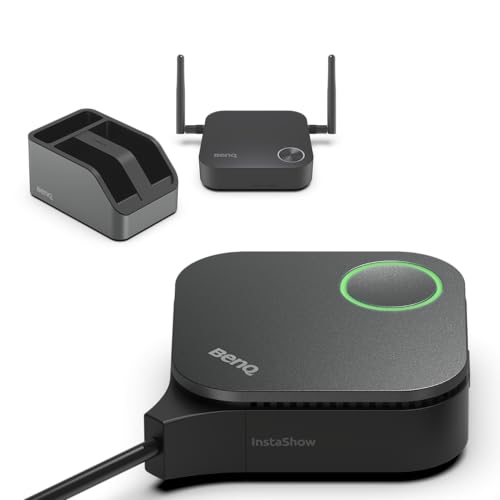
BenQ lists a 4K UHD wireless presentation system with interchangeable USB-C and HDMI button cables, a button tray, and no stated need for drivers, software, apps, or network configuration. Its differentiating feature is wireless touchback control up to 40 feet, allowing the interactive display to control presentation slides from the room display without a data cable.
The listing supports Windows, macOS, iOS, and iPadOS, and describes 128-bit encryption plus CVSS 4.0 certification. It is the deliberate choice for a meeting room built around an interactive screen and mixed laptop connector types. If the room only has a standard monitor or projector, the touchback feature is not a reason by itself to choose BenQ over a simpler wireless HDMI system.
Our TakeBuy BenQ when you want USB-C and HDMI button cables plus touchback control from an interactive display. It is a pick for room infrastructure rather than a dongle, and the listed 40-foot touchback feature is useful only when the display itself supports that collaborative workflow.
- Interchangeable USB-C and HDMI button cables support two stated laptop connection styles in the same presentation system.
- Touchback control is listed up to 40 feet for controlling slides from a compatible interactive display.
- The listing specifies 4K UHD wireless sharing for notebooks, presentations, photos, and video content.
- No drivers, software, apps, or network configuration are stated as requirements for the plug-and-play setup.
- A button tray is included to keep the USB-C and HDMI sharing cables organized in the room.
- 128-bit encryption and CVSS 4.0 certification are stated in the product listing.
- The stated touchback feature is most useful with an interactive display, not an ordinary projector or monitor.
- Its listed 40-foot touchback distance is not a general wireless video range figure.
- The listing does not describe four-presenter quad view or a dual-HDMI output configuration.
Buying Guide
Confirm the transmitter connection on every presenter laptop
The fastest way to choose the wrong system is to assume every USB-C port carries video. ClearClick requires USB-C DisplayPort video output from the laptop, netbook, or smartphone, and its listing also names a host requirement of 2018 or newer. The rule is useful and specific, but it means a USB-C charging port alone is not proof that the transmitter will work.
BenQ approaches mixed laptops differently with interchangeable USB-C and HDMI button cables, while Monoprice lists compatibility across Windows, Mac, iOS, Android, and Miracast. MeetHub’s USB-C dongle also lists several device and casting paths. Before buying, list the actual ports and platforms the room receives. One well-matched transmitter system is more useful than a 4K feature that half the presenters cannot connect to.
Choose one-display, dual-view, or quad-view sharing deliberately
Most rooms need one laptop on one screen most of the time. Monoprice lists two people sharing simultaneously, which is enough for a layout with a presenter and a reference source. SIIG lists dual view, but its feature text says that configuration requires a separately sold dual-view base and additional HDMI transmitter. The extra parts make the dual-view purchase a package decision, not a checkbox on the basic kit.
MeetHub is the explicit multi-source choice with quad view and dual HDMI output. Those features are useful when a team needs to compare four sources or distribute content across two room displays. They add little value to a simple huddle room, so select the output arrangement around the meeting format rather than treating more simultaneous sources as automatically better.
Separate listed output resolution from meeting-room fit
Monoprice lists 4K at 60 Hz, ClearClick lists 4K at 30 fps, and BenQ and MeetHub list 4K output. The figures describe what the product listing says the system can output, but they do not replace checking the room display’s HDMI inputs, resolution, and refresh support. A 4K receiver cannot turn an older display into a 4K display.
ClearClick also says its kit is backward compatible with 1080p, which can be useful in rooms that have not replaced an existing projector or monitor. If the presentation has small spreadsheets, dashboards, or detailed visuals, match the transmitter, receiver, cable path, and screen to the resolution you intend to use. For a basic wireless display link rather than a room presentation system, see our wireless HDMI kit guide.
Decide whether the room needs collaboration controls
SIIG is the choice to examine when the presentation is meant to be edited at the display, because it lists whiteboard and annotation, remote mouse control, and three security levels. BenQ lists a different collaborative function, touchback control from an interactive display up to 40 feet away. These features depend on a room’s display and meeting habits, so neither one is a generic benefit for every conference room.
If a room mostly shows slide decks, Monoprice’s two simultaneous users or ClearClick’s transmit button can be the clearer workflow. If the room runs laptop video meetings with the shared display, camera, and speakers, MeetHub lists BYOM support. Choose the system whose controls correspond to what people actually do after they put a laptop screen on the wall.
Plan the receiver and room network before installation
Every system needs a receiver arrangement at the display, but their listed setup differs. ClearClick includes one 4K HDMI receiver, while MeetHub lists dual HDMI output. SIIG describes both wired LAN and wireless Wi-Fi routing options. BenQ and MeetHub each state setup without drivers, apps, or network configuration, but those product claims do not remove the need to place and power the receiver at the room display.
For a meeting room that also needs an integrated camera and speakers, the presentation system is only one part of the installation. Our video-bar guide covers that separate room device. Keep the presentation link, display input, network policy, and video-conference hardware as individual choices. A system with the right transmitter can still be wrong if its receiver or output arrangement does not fit the room.
Frequently Asked Questions
Which system supports the most listed connections?
Monoprice and SIIG both list up to 16 simultaneous connections. Monoprice says its expanded connection count requires additional compatible 45044 transmitters, while SIIG lists up to 16 connections in a system built for collaboration, with whiteboard, annotation, and segmented routing features.
The number of potential connections is not the same as the number of sources shown at once. Monoprice lists two users sharing simultaneously, SIIG lists dual view with required extra parts, and MeetHub lists quad view. Choose based on whether the room needs many registered presenters or several active displays at the same time.
Which product is best for an interactive touchscreen display?
BenQ’s InstaShow WDC15 is the direct choice because it lists wireless touchback control up to 40 feet. It also includes interchangeable USB-C and HDMI button cables, so it is useful for a room that receives different laptop connection styles and wants the screen to participate in slide control.
Touchback is meaningful only with a compatible interactive display. A room with a conventional projector or standard monitor may get more practical value from a simpler kit with a transmitter and a receiver, such as ClearClick, rather than paying for a control feature the display cannot use.
Do these systems require an app or a room Wi-Fi network?
MeetHub and BenQ each state that setup does not require drivers, apps, or network configuration. MeetHub also lists no Wi-Fi dependency and compatibility with AirPlay, Chromecast, and Miracast, while BenQ describes its own plug-and-play setup for the named supported platforms.
ClearClick instead lists encrypted 5 GHz Wi-Fi in its product details, and SIIG lists both wireless Wi-Fi and wired LAN routing options. Read the description for the particular kit rather than assuming all wireless presentation systems use the room network in the same way.
Which system supports two room displays?
MeetHub is the product that explicitly lists dual HDMI output. It also lists quad view, allowing four presenters on one screen, so it is designed around more complex layouts for the room display than a single HDMI receiver.
For one display with several presenters, Monoprice’s two simultaneous users or SIIG’s dual-view option can be enough. SIIG’s listing says its dual-view setup requires separate products, so verify the complete parts list before building a multi-source room around it.
Can I use a USB-C transmitter with any laptop USB-C port?
No. ClearClick specifically says its transmitter needs a USB-C port with DisplayPort video output. The video output is a direct product requirement, and a USB-C port used only for charging or data does not necessarily provide that video path.
BenQ includes both USB-C and HDMI button cables, which gives a room two stated connection formats. Review the actual laptop ports before choosing the room system, especially where guests bring different Windows, Mac, tablet, or phone hardware.
Bottom Line
Start with the presenter’s physical connection and the display layout. Resolution is useful only after those two pieces fit.
For many devices, Monoprice is the flexible choice.
For multiple displays and quad view, MeetHub is the choice.
For a touch-enabled room, BenQ is the pick.