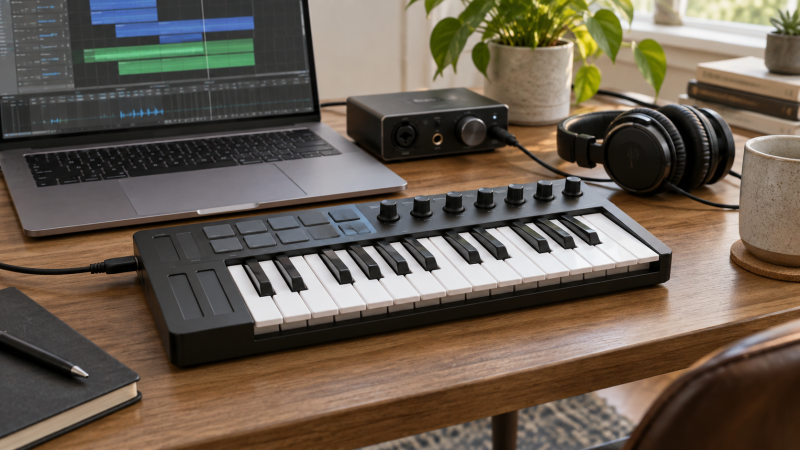
A compact MIDI keyboard gives a laptop producer physical keys without claiming the whole desk. The tradeoff is usually shorter key range and smaller keys. If you mainly enter bass lines, melodies or drum ideas, that may be enough. If you play two-handed piano parts, even 32 mini keys may feel cramped. Measure the desk space beside the laptop and decide whether you need pads and knobs or simply more notes under your fingers.
These six active New controllers cover 25-key and 32-key layouts, a low-profile model, and several pad-heavy options. They send MIDI to software and are not self-contained pianos that produce sound through built-in speakers. Included software, mappings and mobile support depend on the exact product and current vendor terms, so treat bundles as a bonus after the physical layout fits your work.
Choose the playing job first: notes, finger drums, clip launching or hands-on mixing. Then check the host connection, available desk width and whether the keys and controls work with the DAW you actually use.Compact USB MIDI Keyboards Compared
| Image | Product | Details | Check Price |
|---|---|---|---|
 | Akai MPK Mini IV | Keys: 25 mini USB: USB-C listed Controls: 8 pads + 8 knobs Best fit: Hands-on beat and instrument control | Check Price on Amazon |
 | M-Audio Keystation Mini 32 MK3 | Keys: 32 mini USB: USB MIDI listed Controls: Octave, sustain, volume Best fit: More notes in a simple layout | Check Price on Amazon |
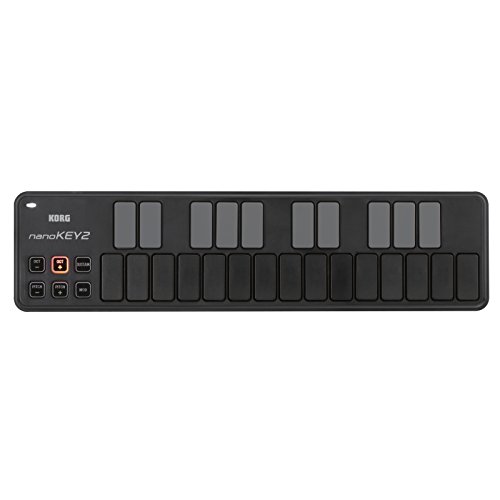 | Korg nanoKEY2 Black | Keys: 25 low-profile USB: USB MIDI listed Controls: Sustain button Best fit: Very low-profile desk | Check Price on Amazon |
 | Arturia MiniLab 3 White | Keys: MiniLab keybed USB: USB controller listed Controls: 8 pads + 4 faders Best fit: Hands-on DAW mixing | Check Price on Amazon |
 | Novation Launchkey Mini 25 MK4 | Keys: 25 mini USB: USB MIDI listed Controls: 16 FSR pads Best fit: Clip and chord workflows | Check Price on Amazon |
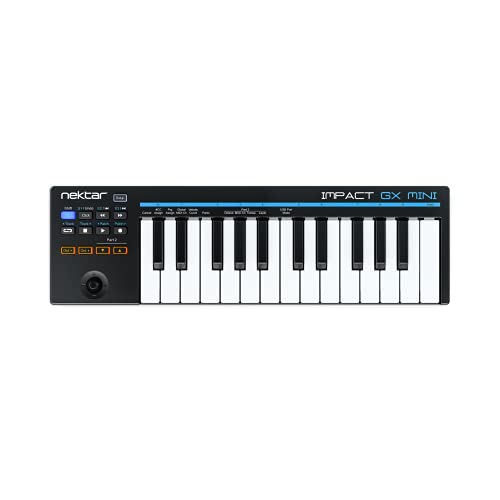 | Nektar Impact GX Mini | Keys: 25 mini USB: USB MIDI listed Controls: DAW integration Best fit: Simple portable songwriting | Check Price on Amazon |
1. Akai MPK Mini IV — Best Pads and Knobs in One Controller
Akai lists 25 mini velocity-sensitive keys, eight velocity- and pressure-sensitive pads, eight assignable knobs, a color screen and a push/turn encoder. The exact black MPK Mini IV offer also names USB-C and a full-size MIDI Out. That combination suits a laptop desk where one controller needs to enter melody notes, trigger drums and adjust software parameters without reaching for the trackpad every few seconds.
Those extra controls take physical space and setup time. Confirm that the pads and knobs map to the DAW or instrument you use. A screen cannot solve an unsupported workflow. Akai lists bundled instruments and mappings, but software licenses and versions may change. The full-size MIDI Out may be useful for a separate hardware synth, while a software-only producer can ignore it. The mini keys remain a limitation for wide, two-handed parts.
Our Take Choose MPK Mini IV when keys, pads and knobs all have a job in your sessions. If you only need to enter notes, a simpler keyboard may be easier to live with.
- Eight pads and eight assignable knobs.
- USB-C and full-size MIDI Out listed.
- Screen and encoder for local control.
- Only 25 mini keys.
- DAW mappings and bundles need checking.
2. M-Audio Keystation Mini 32 MK3 — Best Extra Mini-Key Range
M-Audio’s compact Keystation gives 32 miniature velocity-sensitive keys, seven more than the 25-key models here. It lists selectable velocity curves, octave buttons, pitch and modulation controls, sustain and a volume knob. Those controls help with simple parts and software instruments without turning the top panel into a drum-pad grid. The USB MIDI listing says it works with Mac and Windows laptops without an additional power supply.
The extra keys do not make it a full-size piano keyboard, but they can reduce octave switching for some melodies or two-hand sketches. If beat pads are central to your sessions, this model does not offer the sixteen-pad Launchkey workflow. Check the host USB connection and current software requirements. The listing does not establish USB-C for this exact model. Bundle access and lesson offers should not drive the hardware decision.
Our Take Pick Keystation Mini 32 MK3 when key range is more important than pads. Its straightforward layout is the point, not a missing feature list to fill with accessories.
- 32 miniature keys.
- Selectable velocity curves listed.
- Octave, sustain and volume controls.
- No pad-based clip workflow in the listing.
- USB-C is not established for this exact offer.
3. Korg nanoKEY2 Black — Best Low-Profile Note Entry
Korg’s nanoKEY2 BK is a low-profile, 25-key USB MIDI controller aimed at laptop use. Its listing says the keys respond to velocity and that a sustain button is included. The nanoKEY2 makes a different physical compromise from piano-style mini keys. The slim shape can fit where a taller keyboard would block a notebook or display, but the key feel may not suit a player who wants familiar piano travel.
It is best treated as a portable note-entry surface, not an all-in-one mixing controller. Confirm the exact cable and computer connection, especially if the laptop has only USB-C ports. The short listing evidence does not establish a pad bank, faders or extensive DAW control for this variant. A compact controller can be excellent for entering a synth riff while still being poor for a long keyboard practice session.
Our Take Choose nanoKEY2 when a very shallow physical profile is your top priority. Try to judge the key feel before buying if expressive piano-style playing is your priority.
- Low-profile laptop-friendly shape.
- 25 velocity-sensitive keys listed.
- Sustain button included.
- Key shape differs from piano-style mini keys.
- No pad or fader bank established here.
4. Arturia MiniLab 3 White — Best Hands-On DAW Mixing
Arturia describes a velocity-sensitive keybed, eight drum pads and four faders in the exact white MiniLab 3 offer. The faders can be a better fit than a knob-only controller when you want a physical way to adjust track levels or instrument parameters. The listing also describes instrument control and track muting. Confirm the current DAW mapping for those actions. Controls are only useful when they operate your software as expected.
The offer text for this exact variant does not state the key count, so this comparison does not rely on a number inferred from the product family. Check the current Arturia specification for the size and host connection before ordering. Mini keys and a small control surface still take room beside the laptop and audio interface.
Our Take Pick MiniLab 3 when hands-on faders and pads are useful to your DAW workflow. Verify the physical dimensions and exact key count from the current product specification.
- Four faders and eight pads listed.
- Velocity-sensitive keybed.
- Track and instrument control described.
- Exact key count absent from retrieved evidence.
- DAW mapping needs confirmation.
5. Novation Launchkey Mini 25 MK4 — Best Clip and Chord Controls
The Launchkey Mini 25 MK4 lists 25 keys and sixteen FSR pads. Novation describes the pads as supporting finger drumming, clip launching, a step sequencer and chord triggers, with polyphonic aftertouch. The pad focus is a different emphasis from a simple note-entry keyboard. It suits a producer who builds patterns or launches ideas from the controller rather than clicking each clip on the laptop.
The listing also names Scale Mode, chords and an arpeggiator, along with integration for several DAWs and Native Instruments software. Check which functions your actual DAW version supports. “Works with major DAWs” is not proof that every mapped action behaves identically. If you mostly record long two-handed keyboard parts, 25 mini keys are still a physical limit. The bundled software should be treated as a changing offer, not a permanent spec.
Our Take Choose Launchkey Mini 25 MK4 when clips, pads and chord tools drive your writing. Its many controls make sense only if your DAW workflow will use them.
- Sixteen FSR pads listed.
- Clip, chord and scale tools described.
- Broad seller-listed DAW integration.
- 25-key range remains limited.
- Software actions depend on the host setup.
6. Nektar Impact GX Mini — Best Simple Portable DAW Keyboard
Nektar’s GX Mini is a 25-key USB MIDI keyboard with mini keys and DAW integration, according to the seller. The short listing names Mac, PC and iOS compatibility and an included Bitwig Studio eight-track package. It can be a sensible choice when the laptop setup needs portable key entry and DAW control without a grid of drum pads. Check the actual software support page for your DAW and host version rather than assuming all integration features are identical.
The offer text does not establish detailed pad, knob or fader counts, so this review does not guess at them. For a desk shared with a keyboard, mouse and interface, simplicity can be an advantage, provided the keybed feels workable for your music. An iPad or phone setup may need an adapter or separate power path, because the seller’s broad compatibility line is not enough to specify that connection for every device.
Our Take Pick GX Mini for a compact 25-key controller when you value portable note entry and Nektar’s DAW integration. Confirm the host connection and software mapping before purchase.
- Portable 25-key format.
- DAW integration described.
- Bitwig eight-track bundle listed.
- Detailed control counts absent from evidence.
- Mobile connections need host-specific checking.
Buying Guide: Choose the Controller Around the Part You Play
Decide how many keys you need on the desk
For melodies, bass lines and short chords, a 25-key mini board may be enough if octave buttons keep the notes you need within reach. A 32-key option gives a little more range without becoming a full-length piano controller. Neither replaces a full-size keyboard for a player who practices two-handed parts or cares strongly about piano key travel. Decide from the part you actually record, not a marketing photo of a crowded desk.
Measure the free width beside the laptop and the depth of the work surface. The Korg nanoKEY2 is low-profile, while pad-heavy models take more top-panel area. Leave space for a mouse, audio interface and cable bend. If the laptop only has USB-C ports, check the exact controller port and the adapter or hub needed. Do not assume that every device in a “USB MIDI” list has the same connector.
Separate keys, pads and software mappings
Pads are useful when finger drumming or launching clips is part of your music. Novation lists sixteen, while Akai and Arturia list eight each. A producer who only enters piano notes may prefer the M-Audio or Korg approach. Faders and knobs feel different. Arturia’s four faders suit level adjustments, while Akai’s eight knobs suit assignable parameters. The right control depends on the software action you repeat, not on whichever panel has the most lights.
Before relying on a bundle, check the DAW version, plugin license and host compatibility in the maker’s current setup guide. Some mappings require additional software. The USB-C dock guide for music production addresses connecting multiple devices to a laptop, and it does not turn a controller into an audio interface. Keep those purchase decisions separate.
Know when a separate MIDI interface matters
A USB keyboard commonly sends MIDI data to a computer, not analog audio to speakers. The DAW or instrument then produces sound through the laptop’s chosen audio path. If you hear nothing, check the software’s instrument track and audio output before blaming the controller. No product here should be treated as a self-contained electric piano with built-in sounds merely because it has keys.
If you connect several hardware synths or drum machines with DIN MIDI ports, our multiport MIDI-interface guide covers that separate routing job. Akai lists one full-size MIDI Out, but one MIDI Out is not equivalent to a multiport routing box. Decide whether you need software control, one hardware connection or many independent MIDI paths before choosing the desk layout.
Frequently Asked Questions
Does a USB MIDI keyboard make sound on its own?
Usually not. These products are MIDI controllers, so the keys send performance information to software or connected hardware. The computer or instrument creates the sound. Do not expect to plug headphones into the controller unless the exact product documentation explicitly lists audio generation and a headphone output.
For a laptop setup, load a virtual instrument in the DAW and select the controller as a MIDI input. Then route the DAW audio to speakers or headphones through the chosen audio device. If notes appear in the software but no sound comes out, check the audio path separately.
Are 25 mini keys enough for learning keyboard parts?
They can handle one-hand melodies, bass lines and small chord ideas, but the short range means frequent octave changes for wider parts. The keys are also smaller than full-size piano keys. A 32-key mini controller provides a little more range, not the feel of a full-size weighted keyboard.
If practice technique or two-handed playing is central, try a larger keyboard before buying the smallest desk model. For beat making or sketching parts on a laptop, the compact size may be the right tradeoff. Choose based on the music you actually play.
Source boundary: Product identities, key counts where stated, control features and software offers come from six exact Amazon US listings checked for active New offers. DAW integration and bundles are seller statements and can change. The featured image is illustrative, not a listed model. Verify ports, host support and included licenses before buying.