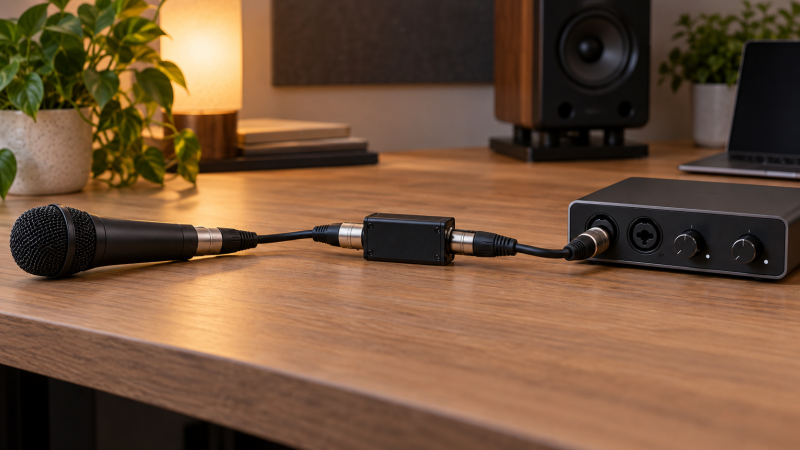
An inline booster is a small gain stage between a passive microphone and a receiving preamp. It can be useful when that mic needs more gain than the preamp can provide comfortably. Before buying, check the signal path, phantom supply and source of the noise. A louder signal alone is not proof that the recording will improve.
Prove that the mic is passive, the receiving input supplies the required phantom power, and the problem is preamp gain rather than room noise.Identify the microphone and input you actually have
Start with the microphone manual. A passive dynamic mic or passive ribbon mic does not require phantom power for its own capsule. Many inline boosters consume 48 V phantom from the downstream preamp while blocking it from the mic side. Cloud Microphones states this behavior for the Cloudlifter family. sE Electronics says the same for its DM1 and DM2 inline preamps. ART documents this path for Dual RP. Check the exact model rather than treating all inline devices as interchangeable.
Next inspect the receiving socket. A combo XLR input can be a mic preamp, but a line-only XLR input or a simple adapter does not automatically provide phantom power or suitable gain. Read the interface or mixer manual and find its per-input phantom setting. If phantom is switched in channel groups, note which other microphones share the switch. Do not assume a USB adapter gives you control over 48 V.
Our inline mic booster roundup compares exact one- and two-channel models. This guide is the check to do before choosing among them, not a reason to add hardware to every XLR chain.
Check whether gain is the real problem
Record a short untreated sample at your speaking or playing distance. Set the preamp so normal peaks leave headroom, then listen at a consistent monitor level. If you hear hiss only when pushing an otherwise suitable preamp hard, added gain before that preamp may be reasonable to test. If you hear a fan, traffic, keyboard or room echo, the mic is already capturing that sound. A booster will raise it along with the voice or instrument.
Compare test recordings at matched playback loudness. A louder sample can seem clearer even if the underlying noise has not changed. Move the mic, reduce room noise and check the cable first. Use the tracking headphone fit guide to avoid confusing headphone volume with the level stored in the recording.
Manufacturer gain numbers are not interchangeable lab results. Triton lists up to 27 dB for FetHead. sE gives the DM2 two selectable settings, 15 and 30 dB. ART’s Dual RP gain changes with loading, while its Amazon listing describes +20 dB. Your result depends on mic, input impedance and setting. Choose a control range you can use without clipping the receiving preamp.
If moving the microphone closer fixes intelligibility, solve placement before buying a gain stage.Trace phantom power from preamp to booster
For the common design that blocks phantom power at the mic side, the path is passive mic → booster → phantom-capable mic preamp. Power flows from the preamp back to the booster. The maker’s circuit stops it before the passive microphone. sE’s DM2 instructions explicitly call for 48 V at the preamp. ART’s Dual RP manual says to connect its outputs to phantom-powered inputs, connect the passive mics to its inputs, then enable phantom and set gain. Follow your exact maker’s sequence.
Turn monitors down while changing connections. Identify input and output ends of an inline tube or box. Connect the cable fully, enable phantom only where the preamp manual requires, and check the preamp meter before raising monitor volume. If there is no signal, inspect the input type and phantom setting before assuming the booster is defective. Avoid hot-plugging a passive ribbon mic into a live phantom-powered chain without following the mic maker’s precautions.
A two-channel booster needs two correctly powered downstream inputs if both channels are used. ART Dual RP has two XLR outputs, not a stereo mix or a USB interface. Its variable impedance and low-cut controls are extra setup decisions. A one-channel device handles one microphone, no matter how many cables are included with a bundle.
Make one controlled purchase decision
If the mic and preamp already produce a usable recording with acceptable noise, keep the simple chain. If gain is limited, decide whether a fixed one-channel booster, an adjustable unit, or a two-channel box matches your sessions. See the inline booster comparison for the exact options whose New Amazon offers were checked for that roundup, and for the difference between a New DM1 cable bundle and a Used-only standalone DM1 listing.
Count the practical extras. A small inline device may need clearance at the mic socket. A box needs a place to sit and another XLR run. A desktop boom arm can help route the cable without hanging weight from a small connector. If you need the same mic at a live mixer and an independent recorder, you have a microphone splitter problem, not a second booster output.
Check the exact product listing again when ordering. Availability, bundle contents and seller can change. A product family name is not enough to establish the gain setting or phantom path for a particular variant.
Frequently Asked Questions
Does the booster provide phantom power to a condenser mic?
Usually it does not for the passive microphone boosters discussed here. Cloud, sE and ART document designs that consume downstream phantom but do not pass it to the microphone. A condenser requiring phantom from the preamp would not receive its needed power through that blocked path.
Check the exact booster and microphone manuals. Some other devices have different power arrangements, so never generalize from an XLR connector alone.
Can a booster repair a noisy recording?
Only if the noise problem is specifically the receiving gain chain and the booster improves that chain under comparable conditions. It cannot remove sounds entering the microphone, a damaged cable, clipping or a noisy power environment.
Record a short comparison at the intended mic distance and match playback loudness. If the noise follows the room or microphone placement, fix the room or placement first.
Do I need one booster per microphone?
Yes, unless the chosen device explicitly has multiple independent channels. One-channel CL-1, FetHead, DM2, CL-Zi and DM1 units handle one source each. ART Dual RP has two paths, but it also needs two downstream phantom-capable preamp inputs.
Do not confuse a stereo headphone output, a two-cable bundle or a mic splitter with two gain channels. Draw the full route from mic to recorder and count the inputs.
Bottom Line
Verify the passive mic, phantom-powered mic input and real gain shortfall before buying anything. Compare recordings at equal loudness and fix room or cable noise first. Then choose the channel count and controls that fit your setup, and follow the exact maker’s phantom-power instructions. The booster roundup is the next step once those checks point to a need.