Thunderbolt 5 marks the biggest leap in external storage performance in over a decade. With up to 80 Gbps of bidirectional bandwidth, TB5 finally lets portable SSDs approach the speed and responsiveness of internal NVMe drives.
For creators, editors, developers, and power users who move hundreds of gigabytes at a time, this isn’t a small upgrade. It’s a fundamental shift in what an external drive can do.
But buying a Thunderbolt 5 drive today is not straightforward.
The ecosystem is new. Real-world speeds rarely match the headline numbers. Sustained performance varies dramatically between drives vary depending on NAND type, thermal design, and cache size.
Moreover, compatibility is a minefield. Unless you have upgraded to a, most laptops today still run Thunderbolt 4 or USB4, and a TB5 SSD plugged into the wrong port may perform no better than the lowest supported speed between the host and the drive performance specifications.
Table of Contents
Comparison of the Best Thunderbolt 5 Drives

Last update on 2026-04-07 at 04:39 UTC / Affiliate links / Images from Amazon Product Advertising API / DetailsProduct prices and availability are accurate as of the date/time indicated and are subject to change. Any price and availability information displayed on [relevant Amazon Site(s), as applicable] at the time of purchase will apply to the purchase of this product.)
TB5 Drives Speed and Performance
The chief reason to upgrade to a TB5 drive is to harness its 80 Gbps bidirectional speed, which is double that of.
But keep in mind that TB5’s 80 Gbps baseline is the total lane bandwidth, not the SSD’s share. Hence, 80 Gbps doesn’t translate into 10GB/s read/writes to the drive.
After PCIe tunneling overhead, protocol conversion, and other connected devices, a single TB5 SSD typically gets enough bandwidth to reach around 4-7GB/s. You rarely hit the theoretical maximum because TB5 prioritizes other traffic over data speed.
Advertised Peaks vs Real-World Speeds
The numbers on the box represent ideal, short-burst conditions. In real use, Thunderbolt overhead, SSD controller behavior, thermal limits, and host bandwidth all reduce these speeds.
A TB5 drive rated for 6,500 MB/s does not consistently deliver that much, making it necessary to check real-world speeds before purchasing a drive.
SLC Cache Problem
Every SSD has an SLC cache, a small, fast “staging area”, where data lands first. Burst speed usually refers to the high speeds your drive achieves while filling the cache. Once it fills, the drive must write to slower TLC or QLC flash. That’s when speeds drop sharply.
With TB5 pushing huge bandwidth, many drives hit this wall within seconds during large video (read large file size) transfers, making sustained speed more important than peak numbers.
Thermal Throttling
Thunderbolt 5 pushes external SSDs harder than ever, and that surge in speed generates significant heat. Most portable TB5 drives warm up quickly, and during long writes, like video offloads or disk backups, they often throttle to protect the NAND, the core storage of the SSD.
Bandwidth Allocation and Sharing
Thunderbolt 5 offers 80Gbps of bi-directional bandwidth, and it unlocks a 120Gbps boost when video workloads ramp up. But TB5 doesn’t treat all traffic equally.
When your system is driving high-resolution displays and transferring huge files to a TB5 SSD, the link must decide who gets priority. And the answer is always the same: your SSD steps aside first.
Video signals require perfectly timed, uninterrupted data streams for which Thunderbolt guarantees rock-solid bandwidth before anything else. Even with multiple 6K or 8K displays active, TB5 ensures smooth output by protecting video traffic.
Data from your SSD, however, is inherently more forgiving. File transfers can pause, dip, and resume without visible impact. When the link becomes congested, TB5 reduces SSD throughput.
In other words, TB5 prioritizes displays, and storage adjusts to whatever bandwidth remains.
TB5 Drive or Enclosure. Which Is Better?
A Thunderbolt 5 drive and a Thunderbolt 5 enclosure may look similar, but they’re built for different types of users. A TB5 drive is a fully finished product: the manufacturer chooses the NVMe controller, tunes the thermals, tests the firmware, and guarantees performance. It’s the simplest, safest option for creators and professionals who want predictable speeds and minimal hassle.
A TB5 enclosure, on the other hand, is a DIY approach. You supply your own NVMe SSD, which means you control capacity, NAND type, PCIe generation, and overall performance. The upside is flexibility; the downside is complexity. Not every SSD runs cool, and not every enclosure can handle the heat or sustain TB5’s maximum bandwidth. Results can vary wildly depending on the SSD you install.
So which is better?
If you want reliability, sustained speeds, proper cooling, and zero guesswork, a TB5 drive wins. If you prefer customization, upgradability, and squeezing out the last bit of performance, and you’re comfortable managing thermals and compatibility, a TB5 enclosure is the more powerful choice.
Now that you have an understanding of how SSDs work and what to look for, let’s look at which are the best Thunderbolt 5 drives available on the market.
Comparison of the Best Thunderbolt 5 Drives
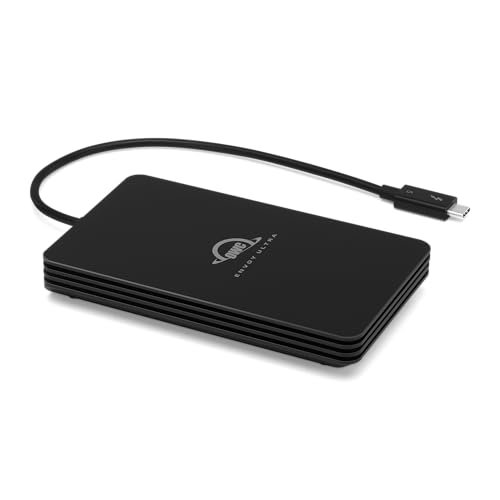
1. OWC Envoy Ultra Thunderbolt 5 SSD – Best Overall
The is one of the first truly next-generation Thunderbolt 5 SSDs, designed to give creators and power users external storage that finally feels as fast as an internal NVMe drive.
OWC offers a 2TB and 4TB variant that aim to deliver top-tier performance in a rugged yet portable body, making it a serious option for anyone who works with large media libraries, high-resolution video, or heavy project files.
In performance tests, the Envoy Ultra shows off exactly what Thunderbolt 5 can do. Real-world tests show read speeds often pushing past 6 GB/s and write speeds noticeably higher than previous Thunderbolt-based SSDs.
OWC built the Envoy Ultra with a sturdy metal enclosure that helps pull heat away from the internal SSD, keeping temperatures in check during demanding workloads. There are no fans and no noise, just passive cooling done well. The integrated Thunderbolt cable adds convenience, and the drive’s overall stability makes it a great fit for on-site video shoots, travel kits, and high-intensity desktop setups where reliability matters as much as speed.
It is the heaviest of all the Thunderbolt 5 drives, weighing more than double that of its closest rival. But the weight isn’t a deal-breaker; rather, it gives it a reassuringly solid feel. Moreover, its sealed design provides resistance against dust, splashes, and minor impacts, making it suitable for field work.
Our Take
The Envoy Ultra is one of the strongest early TB5 SSDs, offering excellent real-world speed, durable construction, and professional-grade stability. If you own a Thunderbolt 5 machine and want true high-performance external storage, this is an easy drive to recommend.
Pros
- Breakneck read speeds and strong write performance
- IP 67 rating means it’s safe from environmental elements.
- Excellent thermal handling despite a no-fan design.
- More cost-effective than Apple’s SSD upgrades
- The bus-powered design eliminates the need for an external power unit.
Cons
- Lacks modularity with its integrated cable
- It is heavy when compared to rival devices.
- Only two variants: 2TB and 4TB
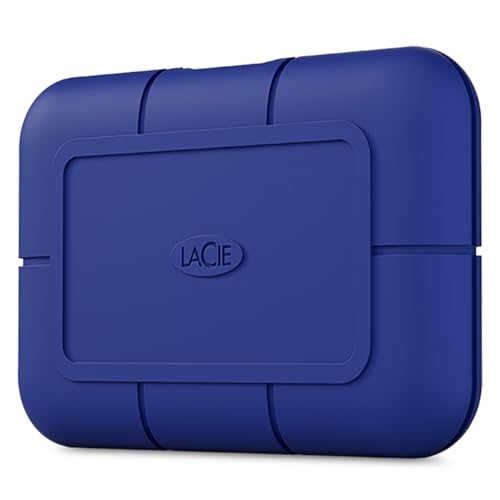
2. LaCie Rugged SSD Pro5 – IP 68 Rated
The LaCie Rugged SSD Pro5 launches as a flagship Thunderbolt 5 portable SSD, built for professionals who need blistering speed, rock-solid durability, and true mobility. It promises to give creators and heavy-duty users external storage that feels nearly as fast and robust as an internal NVMe drive, all in a rugged, travel-ready package.
On a native TB5 connection, the Rugged Pro5 delivers astonishing sequential throughput: reads up to 6700 MB/s and writes up to 5,300 MB/s in ideal conditions. For large media files, RAW video, or high-resolution footage, transfers are dramatically quicker than older USB or TB4 drives, significantly reducing wait times for imports, renders, or backups.
The device doesn’t just bank on speed. Its rugged, sealed enclosure is IP68-rated, offering water, dust, shock, and even pressure protection, meaning it’s as ready for fieldwork or outdoor shoots as it is for studio editing.
Thermal management also holds up. Under typical workloads, the drive remains cool enough to operate reliably without throttling. That makes it a solid choice for workflows dealing with heavy, continuous data work, especially when paired with a TB5-equipped machine.
In terms of portability, the Rugged Pro5 is compact and lightweight, weighing less than half its rival from OWC.
It’s designed for creators on the go, vloggers and adventure sports enthusiasts can derive great benefit by using this SSD to store videos from their action cameras.
Our Take
The Rugged SSD Pro5 stands out as one of the fastest, most durable portable SSDs best suited for use in harsh environments like the great outdoors. If you have a TB5-ready system and need top-tier external storage performance with rugged reliability, this drive delivers what many have been waiting for.
Pros
- Blazing-fast sequential reads up to 6,700 MB/s
- Very high write throughput of 5,300 MB/s
- Rugged build with IP68 protection against dust/water/shock.
- Reliable thermal behavior under typical loads
- Modular cable is convenient to replace or use with other TB5 accessories.
Cons
- Only two variants: 2TB and 4TB
- Backward compatibility can be an issue with Thunderbolt 3
3. SABRENT Rocket XTRM 5 – Compact Size
The Rocket XTRM 5 offers internal-drive-like performance in a package that won’t take up much space in your laptop bag. It’s aimed at on-the-go creators, editors, and power users who have hectic workloads and need blisteringly fast transfers.
The drive hits roughly 6 GB/s read and 5 GB/s write speeds, with Sabrent claiming a 64Gbps transfer rate upfront. That translates into huge time savings when moving large files: gigabytes of video footage, project libraries, or backup transfers in seconds instead of minutes. Even when the internal cache is used up, speeds remain well ahead of older USB or TB4 drives.
Design-wise, Sabrent employs a solid aluminum chassis that helps dissipate heat and survive travel or field use. It comes bus-powered, so you don’t need a separate power brick, and the optional silicone sleeve adds useful protection for drops and bumps.
Our Take
The Sabrent Rocket XTRM 5’s pocket-friendly (literally) design is its biggest USP. It delivers near-SSD internal speeds, rock-solid portability, and reliable performance under load. If your workflow requires you to be on the go and you need an SSD that will handle the bumps along the way, the Sabrent Rocket XTRM 5 is for you.
Pros
- Compact and portable form-factor makes it easy to carry around
- Solid aluminum build for durability and heat dissipation
- Bus-powered SSD with no external power supply needed
- Fully backward compatible with TB4/TB3/USB4, though at lower speeds
- 1TB, 2TB, and 4TB variants offer flexibility of choice
- Good thermal behavior under load compared to many portable SSDs
Cons
- Expensive
- Heats under heavy workload
4. ORICO X50 Portable SSD – Most Variants
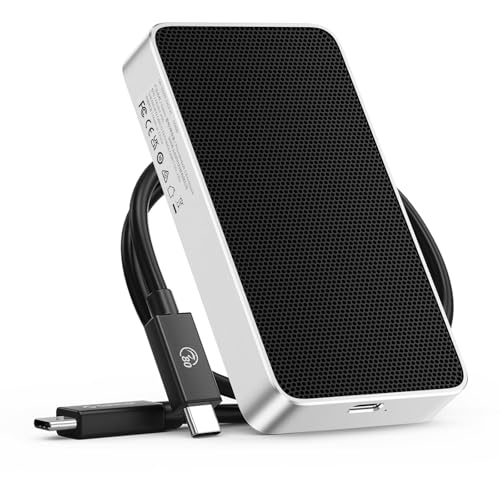
ORICO’s X50 enclosure is among the first wave of Thunderbolt 5 SSDs. While the ORICO X50 offers typical Thunderbolt 5 speeds with an 80 Gbps connection, its USP is the number of variants, along with the option of the “build-your-own high-speed external SSD” type enclosure.
So if you are comfortable tinkering with SSDs and enclosures, the X50 allows you to bring an NVMe storage of your own (think Samsung 990 Pro). Thus, allowing you to customize your Thunderbolt 5 drive, if the choice of four variants (512GB, 1TB, 2TB, and 4TB) isn’t enough.
Either way, the X50 will push transfer speeds close to 6,000 MB/s read and around 5,800 MB/s write under optimal conditions. That means large video files, backups, or media libraries shift far faster than with USB-C or TB4 drives, perfect for workflows needing big bandwidth and quick storage swaps.
On the design side, ORICO went for a fanless, aluminum-alloy body with thermal pad and “hydrogel” heat-dissipation coating. It ensures silent cooling, making it handy and perfect for quiet environments like airplane cabins, allowing you to edit on the go.
Moreover, the modular cable design means you can do with just one TB5 cable in your bag, eliminating the need for additional wires.
Our Take
ORICO’s X50 is a compelling way to get TB5-level external SSD performance with flexibility, silent cooling, and future-proofing. It offers four storage capacities to choose from, five if you are confident building your own drive, giving IT managers the flexibility of choice.
Pros
- High-speed transfers up to 6,000 MB/s read, 5,800 MB/s write
- Fanless, aluminum build with effective passive cooling.
- Broad OS compatibility: macOS, Windows, Linux
- Silent cooling with no fan noise, ideal for quiet environments.
- Five variants, including a TB5 enclosure to bring your own NVMe drive.
Cons
- The bulky design makes portability a challenge.
- Polarizing style means you’ll either love it or hate it.
Best Thunderbolt 5 Drives – Frequently Asked Questions (FAQ)
Does a TB5 drive work on Thunderbolt 4?
Yes. Thunderbolt 5 is fully backward-compatible. A TB5 drive will work on TB4 ports, but you’ll be limited to TB4 speeds, which is usually around 2,700–3,100 MB/s for real-world transfers.
What speed will I get on USB4?
USB4 speeds vary widely. On a good USB4 Gen3 implementation, expect 2–3.5 GB/s. On older or lower-tier USB4, speeds may drop to 1–2 GB/s.
Do I need a special TB5 cable?
Yes, you need a certified Thunderbolt 5 cable. TB4 cables work, but they cap performance to TB4 levels. USB-C cables without TB certification can bottleneck the drive dramatically.
Why is my Thunderbolt 5 drive overheating?
TB5 pushes extremely high throughput, which heats the SSD controller and NAND quickly. Small enclosures trap this heat, especially during large writes. Warm-to-hot metal is normal, but sudden thermal slowdowns suggest the drive is throttling to protect itself.
Why does speed drop after 100–200 GB transfers?
That’s the SLC cache filling up. All NVMe drives have a small “turbo zone” where they write at top speed. Once it’s full, the drive must write directly to slower TLC/QLC NAND, causing a noticeable dip in sustained write speed, especially on long video or backup transfers.
TB5 vs USB4 v2 for SSDs?
USB4 v2 is extremely fast on paper, but hardware support is still rare. Today, TB5 offers more consistent high-end performance, better thermal behavior, and stronger real-world write speeds. USB4 v2 may eventually match or beat TB5, but TB5 is the more reliable choice right now.
Does my Mac/PC actually support TB5 speeds?
You’ll need a device with native Thunderbolt 5 ports. TB4 and USB4 ports will not reach TB5 speeds. On Windows laptops, make sure the port is labeled TB5 or appears as such in system specs; on Macs, as of early 2025, TB5 is limited to specific newer models only.
Is it safe to run a VM or game off a TB5 SSD?
Absolutely. TB5 offers low latency and high throughput, so VMs, games, and development workloads run smoothly. Just ensure the drive stays cool, as thermal throttling can slow performance during long sessions.
What Factors Affect the Read/Write Speed of TB5 Drives?
- Type of files being transferred (large sequential vs small random files)
- Port type on the host device (TB5 vs TB4 vs USB4)
- Internal SSD type (PCIe generation and NAND type)
- SLC cache size and cache behavior
- Thermal design and enclosure cooling efficiency
- Display and peripheral bandwidth sharing on the TB5 link
- Cable quality and TB5 certification
- Host system performance (CPU load, RAM, internal drive speed)